Goods Transaction
Application > Warehouse Management > Transactions > Goods Transaction
Overview
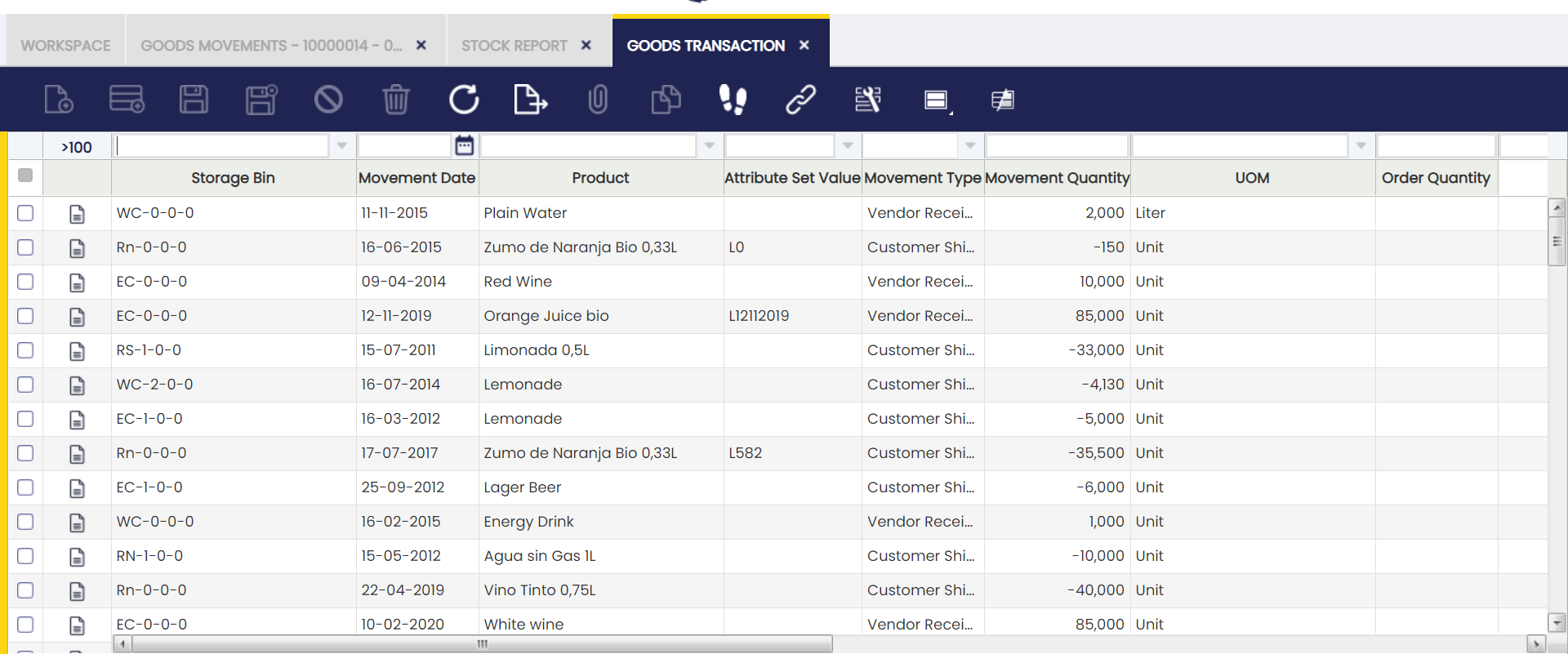
The Goods Transaction window is the central record of every inventory movement in Etendo. It gives you a complete history, with the exact date and time of each movement — what moved, when, where, and why — so you can trace any change back to its source.
This window captures every inventory movement recorded in the system, including Goods Receipts, Goods Shipments, Physical Inventories, Goods Movements, Work Efforts, Internal Consumptions, Return to Vendor, and Return from Customer. Each movement appears here as a single line entry as soon as it is processed in the system — no extra steps needed.
You can filter this window by warehouse, product, date range, or movement type and see results immediately — there is no need to run or generate a report. The window is read-only: you can view and filter records, but cannot create or edit them here.
When to Use This Window
- Investigating a stock discrepancy: filter by product and date range to find all movements that affected a stock level and identify what caused the change. Use the Stock Report to see the resulting current stock levels per bin.
- Auditing a specific transaction: confirm the exact quantity and movement type recorded after processing a Goods Receipt, Goods Shipment, or Physical Inventory. Use the Material Transaction Report for the associated cost and accounting details.
- Tracing a lot or serial number: filter by Attribute Set Value to see the complete movement history of a tracked item from receipt to shipment. The Product Movements Report provides the same history with additional filtering by warehouse and date.
- Verifying a storage bin's activity: filter by Storage Bin to review every movement that has affected a specific warehouse location. Use Stock History to see what stock levels looked like at any point in the past.
Columns
Each row in the Goods Transaction window represents one inventory movement line. The columns below describe the information shown for each entry.
- Storage Bin: The specific shelf, rack, or location inside the warehouse where the stock was taken from or placed into.
- Movement Date: The date the movement was recorded in Etendo, used for costing and accounting purposes.
- Product: The product involved in the transaction.
- Attribute Set Value: The lot number or serial number of the product, if the product is set up for lot or serial tracking in Etendo. This field is empty if the product does not use tracking.
- Movement Type: The category of the inventory transaction (for example, Vendor Receipt, Customer Shipment, or Physical Inventory).
- Movement Quantity: The quantity moved. Positive values indicate a stock increase; negative values indicate a stock decrease.
- UOM: The unit of measure for the product.
- Order Quantity: The quantity from the original purchase or sales order line that triggered this movement, if the movement came from an order. This field may be empty for physical inventory adjustments.
Movement Type
The Movement Type column identifies the category of each inventory transaction. The main movement types include:
- Vendor Receipt: stock received from a supplier.
- Vendor Return: stock returned to a supplier.
- Customer Return: stock returned by a customer.
- Customer Shipment: stock shipped to a customer.
- Movement To: stock arriving at the destination storage bin after an internal transfer.
- Movement From: stock leaving the source storage bin during an internal transfer.
- Inventory In: stock increase recorded during a physical inventory.
- Inventory Out: stock decrease recorded during a physical inventory.
- Work Effort In: stock added as output of a production work effort.
- Work Effort Out: stock consumed as input of a production work effort.
- Internal Consumption: stock removed for internal use.
- Internal Consumption Reversal: stock returned to inventory after an internal consumption was undone.
Filters
Filters are applied directly in the column headers. Type a value or select a range in any column header and the grid updates immediately.
Useful filter combinations for common warehouse tasks:
- Product + Movement Date range: traces all activity for a specific item over a given period. Use this combination for stock reconciliation or supplier claims.
- Movement Type: isolates one category of transaction — for example, all Vendor Receipts or all Customer Shipments. Use this to review a specific flow without noise from other movement types.
- Storage Bin: audits all movements that affected a specific warehouse location. Use this to identify misplaced stock or confirm a bin is empty.
- Attribute Set Value: tracks the full movement history of a specific lot or serial number from receipt to shipment. Use this for traceability and quality investigations.
This work is a derivative of Warehouse Management by Openbravo Wiki, used under CC BY-SA 2.5 ES. This work is licensed under CC BY-SA 2.5 by Etendo.