Price List Schema
Price List Schema
Application > Master Data Management > Picing > Price List Schema
Overview
A price list schema is a template used to automatically populate a new version of a price list.
Price List management is not an easy task to handle, mainly in competitive markets where the margins are very tight.
Nowadays, organizations have to deal with a huge variety of products, which have different prices depending on the season and other pricing variables.
Etendo manages prices through three pricing related concepts:
- the Price List
- the Price List Schema
- and the Price List Version
And it allows the creation of:
- General Sales and/or Purchase Price List
- Specific Price Lists for a specific supplier or customer, or a group of them.
- Based on cost Price list based on product cost
The way these concepts work in Etendo is described below:
- Creation of Price List/s:
- A "Default Price List Schema", with no configuration at all, is created by default after creating an organization.
- The "Default Price List Schema" is the schema to be used in the creation of the price lists which are NOT a "Price List Version".
- The Price Lists linked to the "Default Price List Schema" might contain both the net list price and the net unit prices of the products.
To learn more, visit Price List. - The Price list/s created can be linked to the business partners as required.
To learn more, visit Business Partner
- Creation of Price List Schema/s:
- New Price List Schema can be created as a way to configure a set of commercial rules to be applied to existing price lists.
To Learn how, keep reading.
- New Price List Schema can be created as a way to configure a set of commercial rules to be applied to existing price lists.
- Creation of Price List Version/s:
- A new version of an existing Price List is created as a combination of a base price list and a given "Price List Schema".
To learn more, visit Price List. - The Price list/s versions created can be linked to the business partners as required.
To learn more, visit Business Partner.
- A new version of an existing Price List is created as a combination of a base price list and a given "Price List Schema".
Header
Price list schema window supports the creation of as many price list schemas as required with the aim of obtaining an easy management of price lists and price list versions.
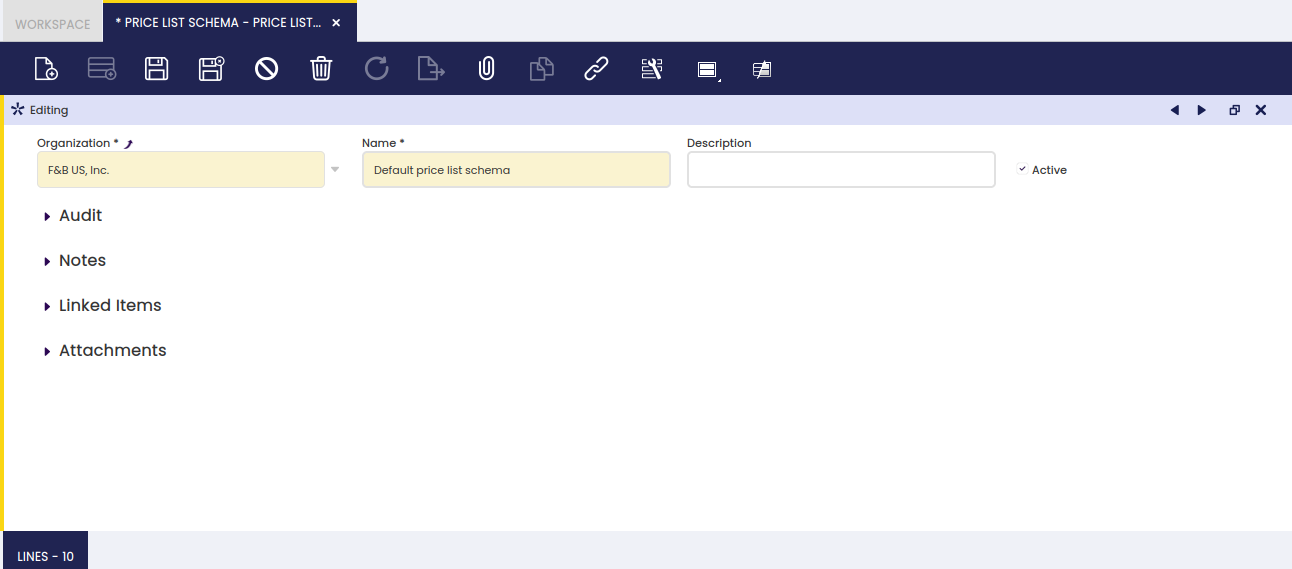
As shown in the image below, the creation of a price list schema is as easy as to create it and give it a Name.
The set of price and discount rules which might apply to a set of product categories or specific products must be configured in the "Lines" tab.
Lines
Price list schema lines tab allows defining a set of price rules such as to apply a discount % to the net unit price of a given product category or specific product.
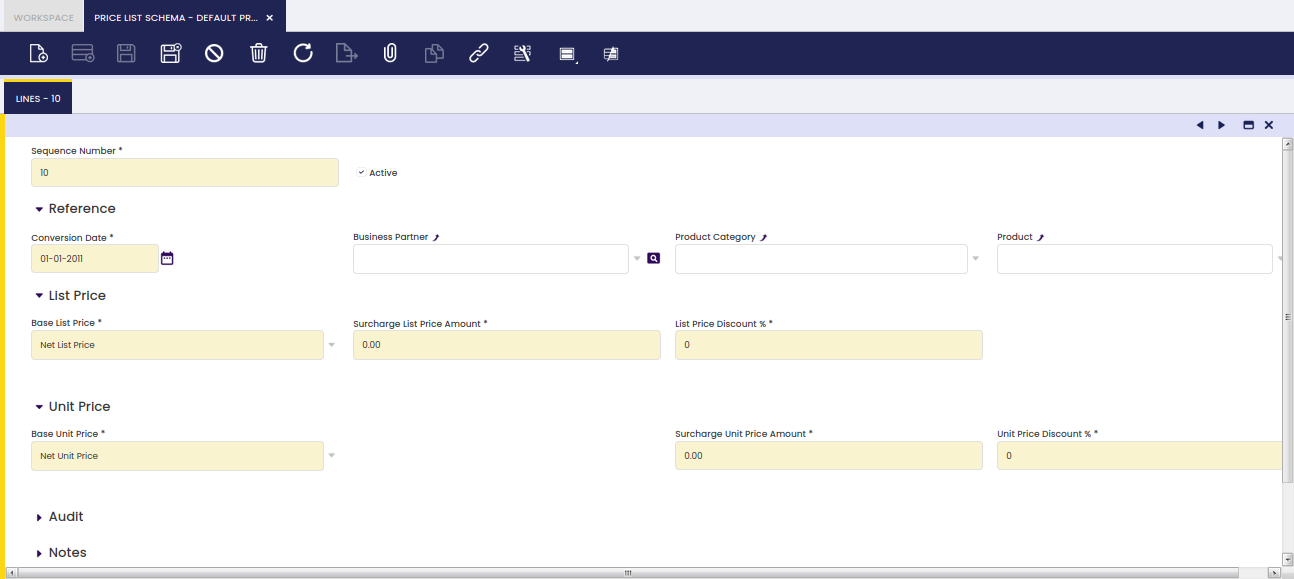
First thing to notice is that, as shown in the image above, "Lines" tab is split into two sections:
- the first section allows the user to:
- Inform Etendo about:
- the "Business Partner" and/or
- the "Product Category" and/or
- the "Product"
to which the price/discount rules to be defined in the next section are going to apply.
- the second section allows the user to:
- configure which price of the existing price list is going to be taken as "Base List Price" in the new price list version. The options available are:
- Net List Price which is the price published in the price list
- Net Unit Price which is the final price used in purchase and sales order/invoice lines
- Fixed Price, as it is possible to configure that for the new price list version, therefore the net list price is equal to a given fixed price.
- Cost, which is the price published in the price list, will be the product cost (costing tab in product window) and a margin.
- Fixed Price or Cost Based combines the previous two options with the following condition:
- If the fixed price is higher than the cost, then the defined fixed price is selected.
- If the fixed price is lower than the cost, then the cost (plus the defined margin) is selected.
- Fixed Price or Cost plus Margin Based combines fixed price and cost options with the following condition:
- If the set fixed List/Unit price is higher than the current cost plus List/unit Price margin, the price list will be created with the fixed price.
- If the set fixed List/Unit price is lower than the current cost plus List/Unit Price margin, then the price list will be created using the cost plus the margin.
- configure which price of the existing price list is going to be taken as "Base Unit Price" in the new price list version. The options available are the same as above:
- Net List Price
- Net Unit Price
- Fixed Price, as it is possible to configure that for the new price list version, the net unit price is equal than a given fixed price
- Cost
- Fixed Price or Cost based
- Fixed Price or Cost plus Margin Based
- configure the discounts if any to apply to the net unit price and/or to the net list price in the fields:
- List Price Discount %
- Unit Price Discount %
- configure the margin on the product cost to apply to the net unit price and/or to the net list price in the fields:
- List Price Margin %
- Unit Price Margin %
Second thing to notice is that the set of price rules and/or discounts could be configured in a "hierarchical" way, that's line by line or applying the last valid price rule (non-hierarchical way).
Info
The Enable Hierarchical Price List preference is available in order to select the desired behavior applying the price list rules.
Let us imagine that the rules which need to be part of a price list schema are:
- to apply a net unit price discount of 5% to the products which belong to a Product Category X.
- to apply a net unit price discount of a 10% to the products which belong to the Product Category Y.
- to apply a net unit price discount of 15% to the Product X that belongs to Product Category X.
The way this works in Etendo is:
- the price list schema must contain 2 lines one per each discount rule to be applied:
- First Line will contain information such as:
- Sequence Number = 10
- Conversion Rate Type = Spot
- Product Category = Product Category X
- Base Net Unit Price = Net Unit Price
- Net Unit Price Discount = 5.00
- Second Line will contain information such as:
- Sequence Number = 20
- Conversion Rate Type = Spot
- Product Category = Product Category Y
- Base Net Unit Price = Net Unit Price
- Net Unit Price Discount = 10.00
- Third Line will contain information such as:
- Sequence Number = 30
- Conversion Rate Type = Spot
- Product Category = Product Category X
- Product = Product X
- Base Net Unit Price = Net Unit Price
- Net Unit Price Discount = 15.00
Using hierarchical behavior:
- unit price discount of 5% is applied to the products which belong to a Product Category X.
- unit price discount of 10% is applied to the products which belong to a Product Category Y.
- unit price discount 15% is applied to Product X, in addition to the 5% discount for belonging to Product Category X.
Using non-hierarchical behavior:
- unit price discount of 5% is applied to the products which belong to a Product Category X, except to Product X.
- unit price discount of 10% is applied to the products which belong to a Product Category Y.
- unit price discount of 15% is applied to Product X.
This work is a derivative of Master Data Management by Openbravo Wiki, used under CC BY-SA 2.5 ES. This work is licensed under CC BY-SA 2.5 by Etendo.