Execution Process
Application > Financial Management > Receivables and Payables > Setup > Execution Process
Overview
Some payment types require an additional activity to be executed upon completion of the payment.
For instance, a payment with a check might require the recording of the check number and the printing of the check.
Overall, the execution process is a definition of the activity/ies that the system or the user has to execute to get that a payment is finally recorded as:
- made/withdrawn from the financial account
- or received/deposited in the financial account.
Process
The execution process window lists the available execution processes.
Etendo delivers by default execution processes described below:
- Simple Execution Process - this process runs a system activity which changes the payment status from "Awaiting Execution" to "Payment Received"/"Payment Made" (or "Deposited not Cleared"/"Withdrawn not Cleared")
- Print Check simple process - this process opens a window which allows the user to enter a check number while processing the payment.
- Leave as Credit - this process is just use Return Materials functionality as it allows the user to change a negative payment in/out into a positive credit for the business partner (customer/vendor).
The payments that require a separate activity to be executed need to be configured to make them work, that implies the selection of the "Automatic" option in the field "Execution Process", therefore an execution process of the ones listed above can be selected while configuring the payment method.
Parameter
The parameter tab allows the user to configure the additional activity to execute upon completion of a payment. For instance, to record a check number.
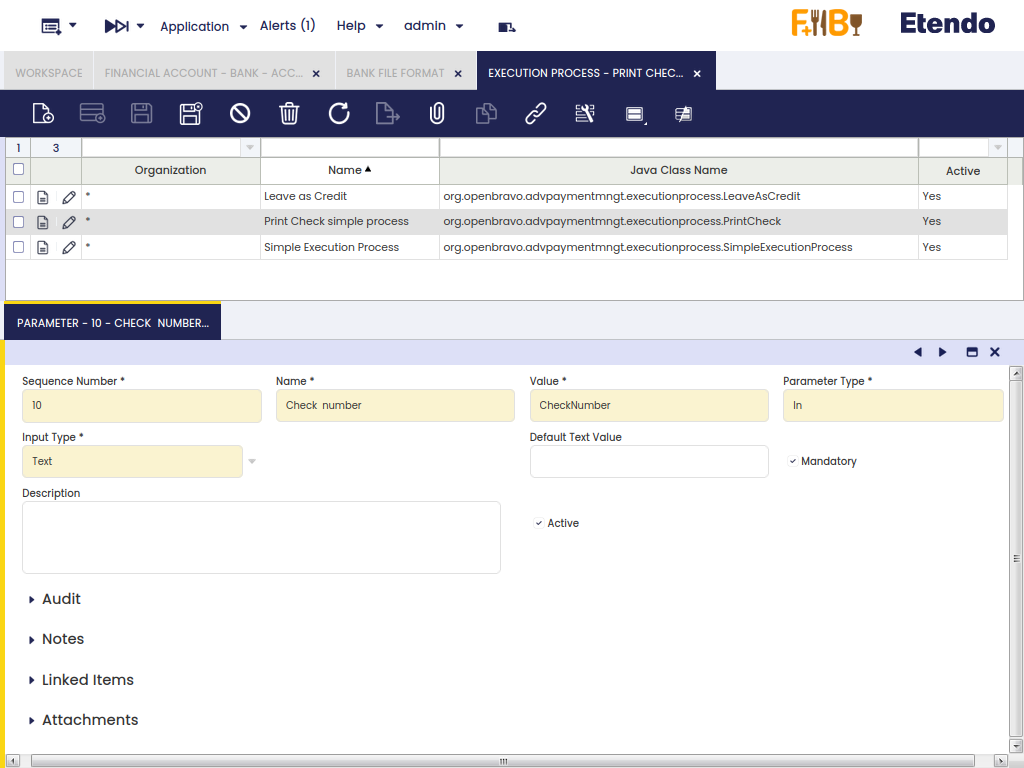
As shown in the image above, the "Print Check Simple Process" has one parameter named "Check Number". That parameter is an "In" "Parameter Type" which "Input Type" is "Text".
Above configuration means that the check number needs to be entered as a text by the user.
An "In" parameter type can also be a checkbox, therefore instead of entering a text, the user needs to select a checkbox or not. It is also possible to define whether the default value of the checkbox is going to be "Yes" or "No".
Besides, the parameter types can also be a "Constant", therefore the "Default Text Value" of the constant can be specified.
Info
The value register for any of the above defined parameter's types is saved in the Parameters tab of the corresponding payment run.
This work is a derivative of Financial Management by Openbravo Wiki, used under CC BY-SA 2.5 ES. This work is licensed under CC BY-SA 2.5 by Etendo.