Not Posted Transaction Report
Application > Financial Management > Accounting > Transactions > Not Posted Transaction Report
Overview
Not Posted Transaction Report lists the transactions and/or documents in status Complete which are not already posted.
This report can be used to make sure that there are no documents pending to be post:
- while closing an accounting period or a fiscal year as once a period is closed it is not possible to post within that period
- while running financial reports, as not posted transaction or document will not be taken into account in the financial reports
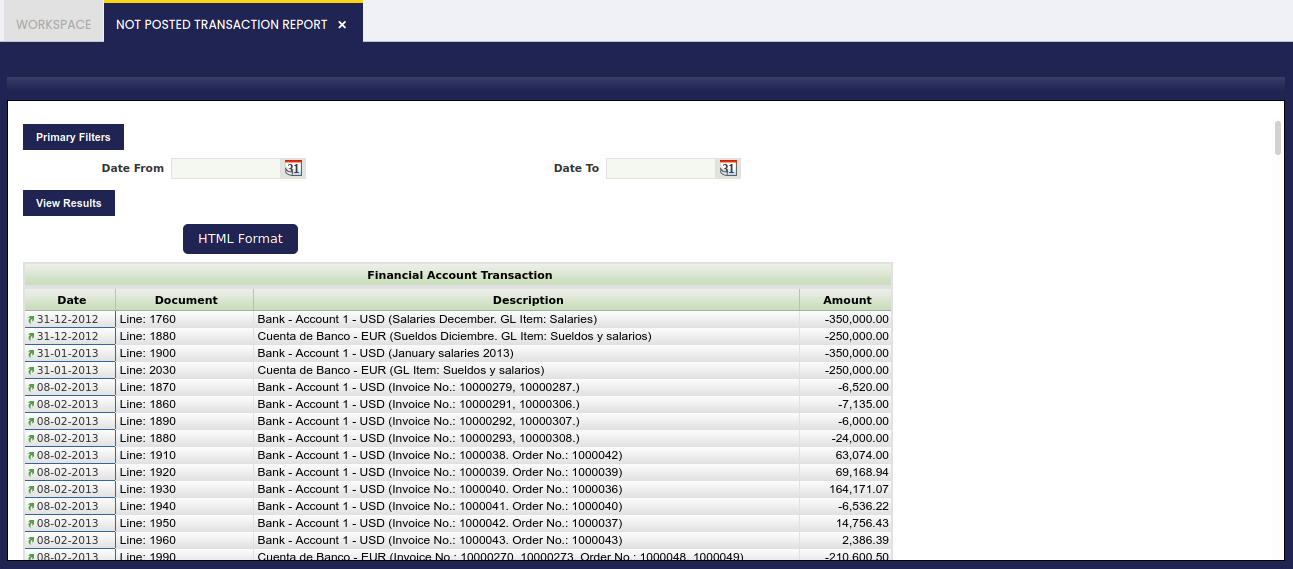
Not posted transactions and/or documents shown are split by type, for instance:
- Journal
- Vendor Invoice
- Invoice or customer invoice
- Vendor Payment
- Financial Transaction
- Receipt or payment in
- etc
and it is possible to navigate to the document not posted and therefore get it posted by clicking on the Date field next to the document or transaction.
Finally, it is important to remark that:
- Date From and Date To filters allows the user to narrow down the not posted transactions to be shown in the report by taking into account their transaction or document date.
- It is not required to enter a general ledger configuration to narrow down the accounting information because:
- if a document is not posted, it is not posted for any of the general ledgers for which it should be posted
- and if a document is posted, it is posted for all the general ledgers for which it should be posted.
This work is a derivative of Financial Management by Openbravo Wiki, used under CC BY-SA 2.5 ES. This work is licensed under CC BY-SA 2.5 by Etendo.