How to Implement a Business Event Handler
Overview
A business entity event is a hook that runs Java code automatically when a record is saved, updated, or deleted. Records in Etendo's data model are called entities. Use business entity events to enforce business rules in Java instead of writing database triggers.
Business entity events run in the same transaction as the triggering operation. Any changes you make to the entity persist together with the original change. The full data access layer is available inside event handler code — you can query, create, and persist objects freely.
Business entity event behavior
- Events fire before the database operation completes, so you can still modify the entity.
- Events only fire when data is accessed through the data access layer. Classic windows and direct JDBC calls do not trigger them.
Business events use Weld, Etendo's dependency injection framework, to discover and register event handler classes automatically. The annotations on the method parameters are sufficient — no XML configuration is required. For more information, see Weld.
Note
Certain parts of the classpath are excluded to maximize performance. If your event handlers are not found, check this section.
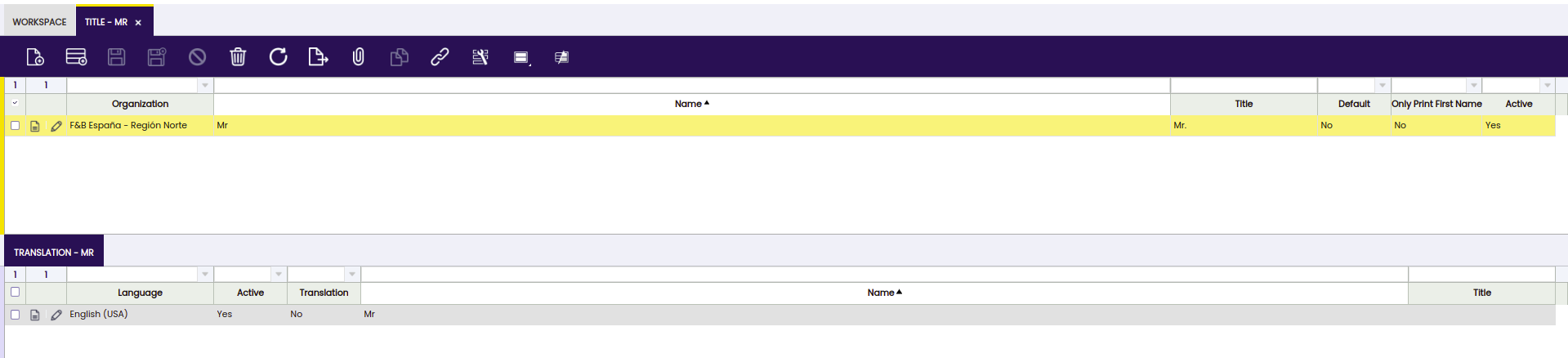
The example in this guide implements an event handler on the Greeting entity. Whenever a title is saved, the handler adds a Dutch translation. It also logs messages to the console for other business events.
Note
For client-side (JavaScript) event handlers that run in the browser UI, see Client Event Handler Actions below.
Choose a server-side event handler when you need to enforce business rules regardless of how data is accessed — through the UI, an API call, or a background process. Choose a client-side event handler when you need to react to UI events in the browser, such as showing a message after a save, blocking a form submission, or refreshing a grid.
Example Module
The code shown in this guide is available in the following example module: com.etendoerp.client.application.examples
Note
The full list of required Java imports is available in the example source file. Copy the package declaration and all imports from that file before compiling — the snippets below omit them for brevity.
The Event Handler — A First Implementation
An event handler is a Java class in your module that extends EntityPersistenceEventObserver. Weld automatically treats it as @ApplicationScoped — you do not need to add that annotation manually. Weld discovers the class from the annotations on the method parameters; no XML configuration is required.
Warning
Do not call setters on the event entity directly. When the event fires, the persistence framework has already captured the object's current field values. Calling a setter updates the Java object in memory, but Hibernate has already captured the property values into its internal state array, so the change is silently ignored and will not be persisted. Use event.setCurrentState(property, newValue) instead. This is shown in every code example on this page.
class GreetingEventHandler extends EntityPersistenceEventObserver {
  private static Entity[] entities = { ModelProvider.getInstance().getEntity(Greeting.ENTITY_NAME) };
  private static final Logger logger = LogManager.getLogger();

  @Override
  protected Entity[] getObservedEntities() {
    return entities;
  }

  public void onUpdate(@Observes EntityUpdateEvent event) {
    if (!isValidEvent(event)) {
      return;
    }
    logger.info("Greeting {} is being updated", event.getTargetInstance().getId());
  }

  public void onSave(@Observes EntityNewEvent event) {
    if (!isValidEvent(event)) {
      return;
    }
    logger.info("Greeting {} is being created", event.getTargetInstance().getId());
  }

  public void onDelete(@Observes EntityDeleteEvent event) {
    if (!isValidEvent(event)) {
      return;
    }
    logger.info("Greeting {} is being deleted", event.getTargetInstance().getId());
  }
}
Note
- Extend EntityPersistenceEventObserver to filter events correctly.
- The method name is not relevant. Weld detects and registers the handler from the annotation and type of the parameter.
- Use the
org.apache.logging.log4j.Loggerclass for logging.
Result
Add the class to your module and restart the system. Open the greeting window at http://localhost:8080/etendo/?tabId=282 and perform some actions. The console shows messages like:
Greeting FF8081813097E041013097E805F4000F is being updated
Greeting FF8081813097E041013097E805F4000F is being deleted
Greeting FF8081813097E041013097E805F4000F is being created
Note
- Implement only the methods for the events you want to handle. If you only need update events, implement only the method with
@Observes EntityUpdateEvent. - Each method starts with
isValidEventto filter for relevant events only. See Filtering Only Relevant Events below. - Use the API on the event object to identify the event type and access the current and previous state of the entity. See here for more information.
Filtering Only Relevant Events
Every event handler receives events from every entity in the system, not just the ones it was written for. If you omit the filter, your code runs on every insert, update, and delete across the entire application. The isValidEvent check restricts execution to the entities listed in getObservedEntities.
private static Entity[] entities = { ModelProvider.getInstance().getEntity(Greeting.ENTITY_NAME) };

@Override
protected Entity[] getObservedEntities() {
  return entities;
}
isValidEvent calls getObservedEntities internally to determine which entities are relevant. Add this check at the start of each event handling method:
In this example, only changes to the Greeting entity are handled. All other entity events are filtered out.
Note
isValidEvent also returns false during data import operations. This is intentional — it prevents business logic from running on imported data. If your event handler is not firing, check whether the operation is being performed through an import process.
Adding Business Logic
The next examples extend the event handler with two behaviors:
- Append a dot to the greeting title on create or update, if one is not already present.
- Create a translation child record when a new greeting is saved.
Changing the Entity on Update or Insert
The updated onUpdate and onSave methods below add a dot to the title if it does not already end with one.
public void onUpdate(@Observes EntityUpdateEvent event) {
if (!isValidEvent(event)) {
  return;
}
final Greeting greeting = (Greeting) event.getTargetInstance();
final String title = greeting.getTitle();
if (title != null && !title.endsWith(".")) {
  final Entity greetingEntity = ModelProvider.getInstance().getEntity(Greeting.ENTITY_NAME);
  final Property greetingTitleProperty = greetingEntity.getProperty(Greeting.PROPERTY_TITLE);
event.setCurrentState(greetingTitleProperty, title + ".");
}
logger.info("Greeting {} is being updated", event.getTargetInstance().getId());
}
public void onSave(@Observes EntityNewEvent event) {
if (!isValidEvent(event)) {
return;
}
final Greeting greeting = (Greeting) event.getTargetInstance();
final String title = greeting.getTitle();
if (title != null && !title.endsWith(".")) {
final Entity greetingEntity = ModelProvider.getInstance().getEntity(Greeting.ENTITY_NAME);
final Property greetingTitleProperty = greetingEntity.getProperty(Greeting.PROPERTY_TITLE);
event.setCurrentState(greetingTitleProperty, title + ".");
}
logger.info("Greeting {} is being created", event.getTargetInstance().getId());
}
Cast the instance and read the title:
final Greeting greeting = (Greeting) event.getTargetInstance();
final String title = greeting.getTitle();
If the title does not end with a dot, resolve the entity and the target property:
if (title != null && !title.endsWith(".")) {
final Entity greetingEntity = ModelProvider.getInstance().getEntity(Greeting.ENTITY_NAME);
final Property greetingTitleProperty = greetingEntity.getProperty(Greeting.PROPERTY_TITLE);
Note
Use the generated constants for entity and property names (Greeting.ENTITY_NAME, Greeting.PROPERTY_TITLE). This gives compile-time checking and is the recommended practice.
Set the new value using event.setCurrentState:
The changed entity does not need to be saved explicitly. The data access layer and Hibernate handle persistence automatically.
Open the greeting window at http://localhost:8080/etendo/?tabId=282. Enter a new greeting without a trailing dot. A dot is added on save. The same behavior applies on update.
Adding a Child Instance
The complete onSave method below replaces the partial version from the previous section. It adds both the dot logic and a Dutch translation child record whenever a new greeting is saved.
public void onSave(@Observes EntityNewEvent event) {
  if (!isValidEvent(event)) {
    return;
  }

  final Greeting greeting = (Greeting) event.getTargetInstance();

  // Add a dot to the title if it does not already end with one
  final String title = greeting.getTitle();
  final Entity greetingEntity = ModelProvider.getInstance().getEntity(Greeting.ENTITY_NAME);
  if (title != null && !title.endsWith(".")) {
    final Property greetingTitleProperty = greetingEntity.getProperty(Greeting.PROPERTY_TITLE);
    event.setCurrentState(greetingTitleProperty, title + ".");
  }

  logger.info("Greeting {} is being created", event.getTargetInstance().getId());

  // Create a translation child record for this new Greeting
  final GreetingTrl greetingTrl = OBProvider.getInstance().get(GreetingTrl.class);
  greetingTrl.setGreeting(greeting);
  // 171 is Dutch — replace with any other Language ID as needed
  greetingTrl.setLanguage(OBDal.getInstance().get(Language.class, "171")); // 171 = Dutch
  greetingTrl.setName(greeting.getName());
  greetingTrl.setTitle(greeting.getTitle());
  greetingTrl.setTranslation(false);

  // Retrieve the translation list property and append the new record.
  // Use getCurrentState here because the list already exists — appending does not replace the whole property.
  final Property greetingTrlProperty = greetingEntity
      .getProperty(Greeting.PROPERTY_GREETINGTRLLIST);
  @SuppressWarnings("unchecked")
  final List<Object> greetingTrls = (List<Object>) event.getCurrentState(greetingTrlProperty);
  greetingTrls.add(greetingTrl);

  // greetingTrl is a child of the Greeting entity and persists with it automatically
}
GreetingTrl is a translation child record linked to a parent Greeting. Etendo uses the Trl suffix to denote translation tables throughout the data model.
The list property is retrieved with getCurrentState and the new record is appended directly. This is correct because adding to an existing list does not require replacing the whole property value with setCurrentState.
The greetingTrl object persists together with the parent Greeting entity — no explicit save call is needed.
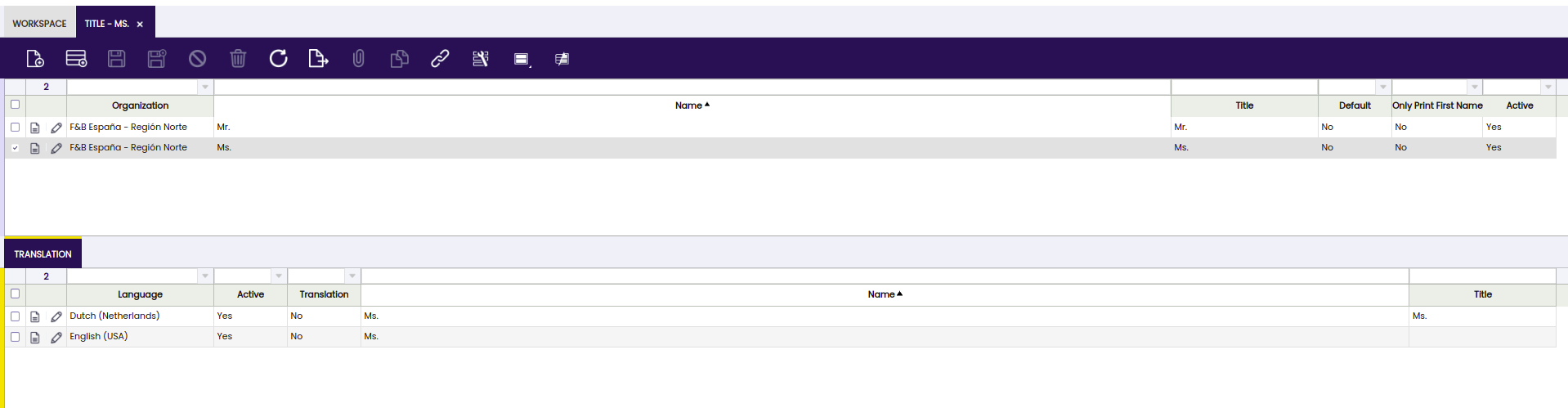
Enter a new record in the greeting window. An additional translation child record is created automatically.
Interrupting the Save Action
Throw an OBException to cancel a save when the user input is invalid. Etendo catches the exception, rolls back the entire transaction — including any changes the event handler had already made — and displays the exception message to the user as an error dialog.
The minimum import required is org.openbravo.base.exception.OBException.
public void onSave(@Observes EntityNewEvent event) {
  if (!isValidEvent(event)) {
    return;
  }
  final Greeting greeting = (Greeting) event.getTargetInstance();
  if (greeting.getTitle() == null || greeting.getTitle().trim().isEmpty()) {
    throw new OBException("Greeting title must not be empty.");
  }
}
Examples of Business Entity Event Handlers
Etendo uses business entity event handlers to implement business logic in various locations. Examples:
The complete source code for the example event handler is at com.etendoerp.client.application.examples.
Client Event Handler Actions
Server-side business event handlers run in Java when a record is persisted. Client event handler actions are different: they are JavaScript functions that execute in the browser before or after a UI event fires on a standard Etendo window. Client handlers interact with the form, grid, and message bar directly — no server round-trip is needed.
Available events
| Event | When it fires |
|---|---|
OB.EventHandlerRegistry.POSTSAVE |
After a record is successfully saved |
OB.EventHandlerRegistry.PRESAVE |
Before the save request is sent to the server |
OB.EventHandlerRegistry.PREDELETE |
Before the delete request is sent to the server |
Defining the Action
A client event handler action is a JavaScript function placed in a JS file within your module. Place it inside a global object using your module's DB prefix to avoid naming collisions.
Every action function must call OB.EventHandlerRegistry.callbackExecutor(view, form, grid, extraParameters, actions) before returning. If it does not, subsequent actions registered for the same event will not execute.
The function receives five parameters:
| Parameter | Description |
|---|---|
view |
OBStandardView — access to the complete window and tab structure |
form |
OBViewForm — the form containing the record fields |
grid |
OBViewGrid — the grid listing records for the tab |
extraParameters |
Event-specific data, e.g. isNewRecord, data |
actions |
The chain of actions to execute — do not modify this value |
Example — show a message after save
OB.MYMODULE = {};
OB.MYMODULE.ClientSideEventHandlers = {};

OB.MYMODULE.ClientSideEventHandlers.showMessage = function(view, form, grid, extraParameters, actions) {
  var data = extraParameters.data;

  view.messageBar.keepOnAutomaticRefresh = true;
  if (extraParameters.isNewRecord) {
    view.messageBar.setMessage(isc.OBMessageBar.TYPE_SUCCESS, 'New Record', 'Created: ' + data.name);
  } else {
    view.messageBar.setMessage(isc.OBMessageBar.TYPE_INFO, 'Updated Record', 'Updated: ' + data.name);
  }
  OB.EventHandlerRegistry.callbackExecutor(view, form, grid, extraParameters, actions); // Required: lets the next registered action execute
};
Warning
Do not declare the global object with var. JavaScript code included in Etendo runs inside a function scope, so a var declaration is not globally accessible.
Registering the JavaScript File
The JS file must be served to the browser by Etendo. Without this step, the browser never loads the file and OB.EventHandlerRegistry.register() never executes.
Create a ComponentProvider class in your module that extends BaseComponentProvider and overrides getGlobalComponentResources(). This method returns the list of static files Etendo includes on every page load.
import org.openbravo.client.kernel.BaseComponentProvider;
import org.openbravo.client.kernel.BaseComponentProvider.ComponentResource;
import org.openbravo.client.kernel.Component;
import org.openbravo.client.kernel.ComponentProvider;

import javax.enterprise.context.ApplicationScoped;
import java.util.ArrayList;
import java.util.List;
import java.util.Map;

@ApplicationScoped
@ComponentProvider.Qualifier(MyModuleComponentProvider.MY_MODULE_VIEW_COMPONENT_TYPE)
public class MyModuleComponentProvider extends BaseComponentProvider {
    public static final String MY_MODULE_VIEW_COMPONENT_TYPE = "MYMOD_ViewType";

    @Override
    public Component getComponent(String componentId, Map<String, Object> parameters) {
        throw new IllegalArgumentException("Component id " + componentId + " not supported.");
    }

    @Override
    public List<ComponentResource> getGlobalComponentResources() {
        final List<ComponentResource> globalResources = new ArrayList<ComponentResource>();
        globalResources.add(createStaticResource(
                "web/com.mycompany.mymodule/js/my-event-handlers.js", false));
        return globalResources;
    }
}
The path passed to createStaticResource() must match the actual location of the JS file under the web/ directory of your module. The second argument (false) controls whether the resource is served in Etendo's classic UI mode. Pass false to include the resource only in the modern UI; pass true to include it in both.
Replace com.mycompany.mymodule with your module's Java package name — the same string used as the module's directory under modules/. The js/my-event-handlers.js segment is the path relative to the web/<your-module>/ directory; the file must exist at that path for Etendo to serve it.
Note
The ComponentProvider class must reside in the root package of your module — not in a sub-package. Weld discovers providers by scanning the classpath, and placing the class in a sub-package prevents discovery. For full details, see Component Provider.
Registering the Action
Register the action using OB.EventHandlerRegistry.register(). Place the registration call in the same JS file, after the function definition.
Before registering, find the AD_Tab_ID of the tab where the action applies. Open Application > Application Dictionary > Windows, Tabs and Fields, locate the tab, and copy the ID. Alternatively, query the database: SELECT AD_Tab_ID FROM AD_Tab WHERE Name = 'YourTabName';
OB.EventHandlerRegistry.register(
  TAB_ID,                                                    // the AD_Tab.AD_Tab_ID value
  OB.EventHandlerRegistry.POSTSAVE,                          // event type
  OB.MYMODULE.ClientSideEventHandlers.showMessage,           // action function
  'MYMODULE_ShowMessage'                                     // unique ID — use your module's DB prefix
);
The unique ID prevents conflicts with actions from other modules and allows overriding them.
Multiple Actions and Execution Order
Multiple actions can be registered for the same tab and event. They execute sorted by a sort property on the callback function (default: 100). When multiple actions share the same sort value, they execute in registration order. Set yourFunction.sort = <number> before calling register() to control relative ordering. To override an action defined by another module, register a new action with the same unique ID.
This work is a derivative of How to implement a business event handler by Openbravo Wiki, used under CC BY-SA 2.5 ES. This work is licensed under CC BY-SA 2.5 by Etendo.