How to Use Secure Web Services
Overview
The Secure Web Services module provides JWT token authentication for standard Etendo web service calls. All services are exposed under the /sws/ path prefix. Authentication flows through /sws/login, and data services such as obRest are available at /sws/com.smf.securewebservices.obRest/. This replaces the session-based /ws endpoint with a secure, token-based alternative (see How to Create a New REST Webservice for background on the /ws framework).
Scope the token to a specific role, organization, and warehouse at login time. Once issued, include the token in the Authorization header of every subsequent request.
Info
Visit the Swagger reference for the full flow.
The module also includes developer utilities and additional web services, such as jsonDal, to access the OB Data Access Layer with JSON.
Setup
Warning
A valid domain name and SSL/TLS certificate are required to use Secure Web Services. Install a certificate or contact your administrator to avoid runtime errors when generating tokens on server instances.
Info
By default, the ES256 encryption algorithm is used. To switch to a legacy algorithm, create a preference with the property Encryption Algorithm and set its value to HS256.
Token Configuration
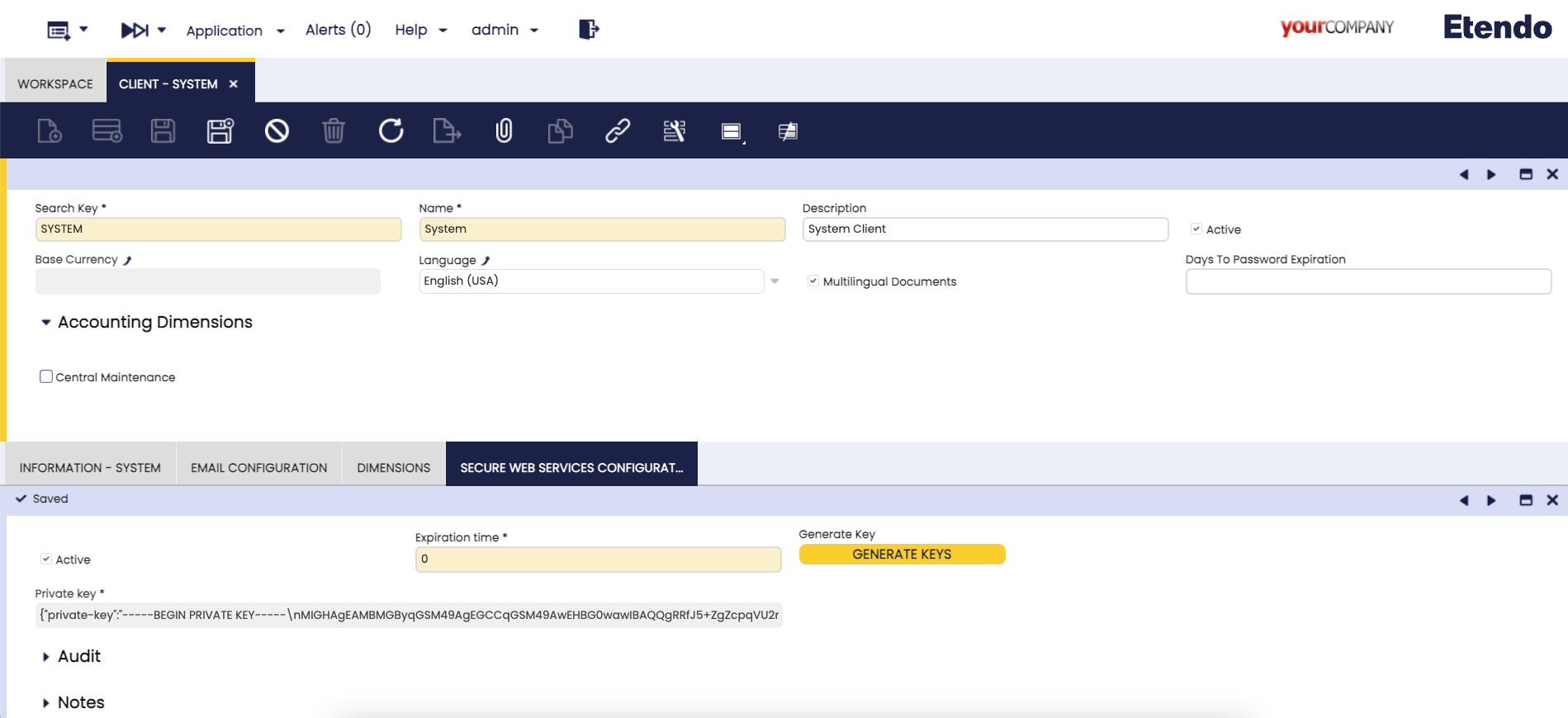
Application > General Setup > Client > Client
In the Secure Web Service Configuration tab, the System Administrator manages the SWS key and configures token expiration.
Starting from Etendo 26.1, the key is automatically generated during ./gradlew install — no manual action is required for new installations. For earlier versions or to rotate the key, use one of the following methods:
-
From the command line:
-
From the UI: Open the Secure Web Service Configuration tab and click Generate Key.
Warning
Both methods overwrite the existing SWS key. All tokens signed with the previous key are immediately invalidated.
The Token expiration field controls how long tokens remain valid, expressed in minutes (0 = no expiration).
Security recommendation
Non-expiring tokens are a risk in production — a compromised token remains valid indefinitely. Set a reasonable expiration time and rotate tokens periodically.
Authentication
Obtaining a Token
The /sws/login endpoint issues a JWT token scoped to a specific Etendo context. Include the optional role, organization, and warehouse fields in the request body to restrict the token to a specific context. Omitting them assigns the user's server-side defaults for each field.
The values for role, organization, and warehouse are internal record IDs (32-character hexadecimal strings) or "0" to use the server-assigned default.
Query parameters
| Parameter | Default | Description |
|---|---|---|
showRoles |
true |
Include the roleList array in the response |
showOrgs |
true |
Include orgList within each role entry |
showWarehouses |
true |
Include warehouseList within each org entry |
Set these to false to reduce response payload when context discovery is not needed.
Request body parameters
| Field | Required | Type | Description |
|---|---|---|---|
username |
Yes | string | Etendo username |
password |
Yes | string | Etendo password |
role |
No | string | ID of the role to scope the token to |
organization |
No | string | ID of the organization to scope the token to |
warehouse |
No | string | ID of the warehouse to scope the token to |
Replace https://<your-host> with your Etendo instance URL. All paths below are relative to that base.
Example request — scoped to a specific role and organization
POST https://<your-host>/etendo/sws/login
Content-Type: application/json

{
  "username": "admin",
  "password": "admin",
  "role": "A97CFB945DC84D5BB0B7EC0CE8571F87",
  "organization": "2E60544D37534C0B89E765FE29BC0B43"
}
Example response
{
  "status": "success",
  "token": "eyJhbGciOiJFUzI1NiJ9.<payload>.<signature>",
  "roleList": [
    {
      "id": "A97CFB945DC84D5BB0B7EC0CE8571F87",
      "name": "Sales Representative",
      "orgList": [
        {
          "id": "2E60544D37534C0B89E765FE29BC0B43",
          "name": "F&B US, Inc.",
          "warehouseList": [
            {
              "id": "B2D40D8A5D644DD89E329DC297309055",
              "name": "USA East Coast"
            }
          ]
        }
      ]
    }
  ]
}
The roleList in the response lists all roles, organizations, and warehouses available to the user. Use these IDs to request a more narrowly scoped token in a follow-up call.
Using the Token
Include the token in the Authorization header of every API call:
Example — fetching products via obRest
The segment after obRest/ is the entity name as defined in the Application Dictionary — it matches the Name field on the AD_Table record (for example, Product, BusinessPartner, Order). Replace Product with any other entity name to query that dataset. maxResults is a standard pagination parameter that limits the number of records returned.
GET https://<your-host>/etendo/sws/com.smf.securewebservices.obRest/Product?maxResults=10
Authorization: Bearer eyJhbGciOiJFUzI1NiJ9.<payload>.<signature>
Token Renewal
To renew a token without re-entering credentials, call /sws/login with the existing token in the Authorization: Bearer header instead of username and password. Do not include username or password in the body when renewing — the server ignores credentials when a valid Authorization: Bearer header is present. The server issues a new token with a refreshed expiration date, maintaining the same context. Include role, organization, or warehouse in the body to change the token scope at renewal time.
Example renewal request — same scope (empty body)
Send an empty body to renew the token and keep the existing role, organization, and warehouse scope unchanged.
POST https://<your-host>/etendo/sws/login
Authorization: Bearer eyJhbGciOiJFUzI1NiJ9.<payload>.<signature>
Content-Type: application/json

{}
Example renewal request — changing scope at renewal time
Include any combination of role, organization, or warehouse in the body to switch the token scope without re-entering credentials. Omit any field you do not want to change.
POST https://<your-host>/etendo/sws/login
Authorization: Bearer eyJhbGciOiJFUzI1NiJ9.<payload>.<signature>
Content-Type: application/json

{
  "role": "B14F5D9A3EC741C2A9F860DE48A3B721",
  "organization": "2E60544D37534C0B89E765FE29BC0B43"
}
Both variants return the same response structure as the initial login: a new token string and, when the showRoles query parameter is true, the full roleList array.
Secure Web Services Swagger
Info
For more information, visit Secure Web Services Swagger.
This work is licensed under CC BY-SA 2.5 ES by Futit Services S.L.