Business Partner Tax Category
Application > Financial Management > Accounting > Setup > Business Partner Tax Category
Overview
Not all business partners are subject to the same taxes. A domestic supplier subject to VAT and income-tax withholding must be treated differently from an export customer who is zero-rated, or from a business partner whose activity makes them tax-exempt. The Business Partner Tax Category is the configuration element that captures these differences: it is a named group that the system administrator or accountant assigns to customers and vendors so that Etendo knows which tax rates apply to them.
This setup is performed once, during the initial tax configuration of the company in Etendo (typically done by a system administrator or accountant before the system goes live). Once each business partner has a category assigned, every time a user creates an order or invoice, Etendo reads the partner's tax category and automatically populates the correct tax rate on each document line. No manual selection is needed.
Business Partner Tax Category Window
The window lists all existing business partner tax categories and allows new ones to be created. It is possible to define as many categories as the fiscal structure of the company requires.
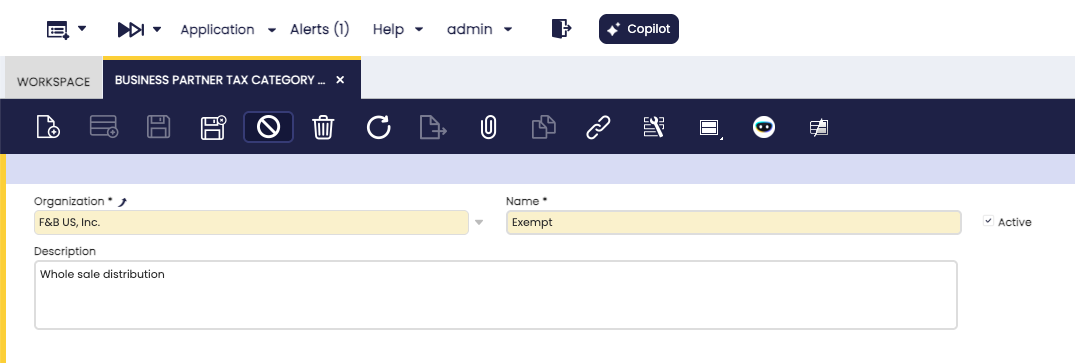
Fields
- Name: The identifier for the category. Use a clear, descriptive label that reflects the tax treatment it represents, such as Standard VAT, VAT + Income Tax Withholding, or VAT Exempt. This name appears in the Business Partner window when assigning the category to a customer or vendor.
- Description: An optional free-text field for internal notes explaining the purpose or scope of the category. It is visible only in this window and helps other administrators understand when to use each category.
- Active: When checked, the category is available for assignment to business partners. If unchecked, the category no longer appears as an option when assigning categories to new or existing partners — however, business partners already using this category are not affected and continue to operate with it.
Assigning the Category to a Business Partner
Once the categories are created, each business partner that requires a specific tax treatment must be linked to the appropriate category. Navigate to Application > Master Data Management > Business Partner. This is done in the Business Partner window:
- For customers: open the Customer tab of the business partner record and set the Business Partner Tax Category field.
- For vendors and creditors: open the Vendor/Creditor tab and set the same field.
A single business partner can act as both a customer and a vendor. In that case, both tabs can have a tax category assigned, and each may be different if the tax treatment differs between purchases and sales.
Note
If a business partner does not have a tax category assigned, Etendo cannot match tax rates restricted to a specific business partner tax category for that partner. Only tax rates with no business partner tax category assigned, and that match the remaining conditions (tax category of the product, geographic zone, document type), are considered when selecting the default tax.
How It Works with Tax Rates
The Business Partner Tax Category is one of several conditions that Etendo evaluates when it determines the default tax for a document line. The full selection logic is described in the Tax Rate page. In summary, the relevant steps are:
- Etendo reads the Tax Category linked to the product on the document line. This narrows down which tax rates are candidates.
- Among those candidates, Etendo filters further by Business Partner Tax Category: a tax rate that has a specific business partner tax category assigned applies only to partners in that category. A tax rate with no business partner tax category assigned applies to any partner.
- When both types exist (specific and unrestricted), the tax rate that matches the partner's category takes priority.
- Additional filters — such as the country or region of the transaction, the document type (order or invoice), and the Cash VAT regime when applicable — are then applied to arrive at the final tax rate.
This means that both steps must be completed together to produce any filtering effect: assigning the category to the business partner, and configuring a matching Business Partner Tax Category on the relevant tax rate. The latter is done in the Tax Rate window, under the More Information section of the Header tab.
The Tax Category page describes how products are grouped for tax purposes, which is the starting point of the same determination chain.
Info
Regardless of the tax rate that Etendo selects automatically, the user can always choose a different tax rate manually on any document line if the specific business scenario requires it.
This work is a derivative of Business Partner Tax Category by Openbravo Wiki, used under CC BY-SA 2.5 ES. This work is licensed under CC BY-SA 2.5 by Etendo.