Material Transaction Report
Application > Warehouse Management > Analysis Tools > Material Transaction Report
Overview
The Material Transaction Report provides a consolidated view of all material movements recorded in the system, including outgoing shipments and incoming receipts. Transactions are grouped by Business Partner — the customer or supplier involved in the transaction — and document, making it straightforward to trace which products were shipped or received, in what quantities, and through which warehouse.
This report is useful for:
- Tracking inbound and outbound material movements over a specific period.
- Auditing inventory transactions to verify that shipments and receipts match expected quantities.
- Reconciling documents by Business Partner to ensure completeness and accuracy of recorded transactions.
To generate the report:
- Set the desired filters in the Filter section.
- The report appears in the View Results section.
- Export the report using the HTML Format or PDF Format buttons, if needed.
Filter
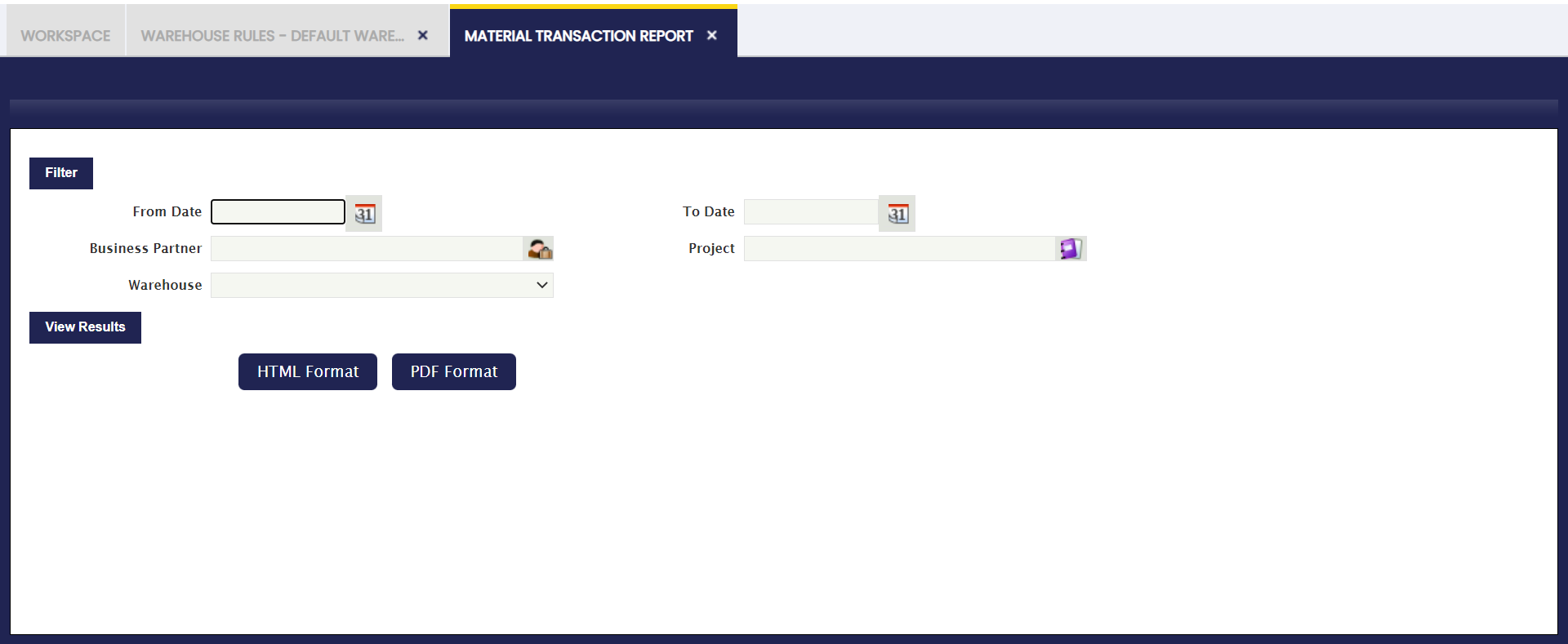
The following parameters allow filtering the data included in the report:
- From Date / To Date: Defines the date range for the report. Only transactions that occurred within this range appear.
- Business Partner: Filters transactions by a specific supplier or customer. Leave empty to include transactions for all business partners.
- Warehouse: Restricts the report to transactions that occurred in the selected warehouse.
- Project: Filters transactions associated with a specific project code, used when the organization tracks costs or transactions by project, for example a construction job or a service contract. Leave empty to include all projects.
After setting the desired filters, the report appears in the View Results section. Export it using the HTML Format or PDF Format buttons, if needed.
View Results
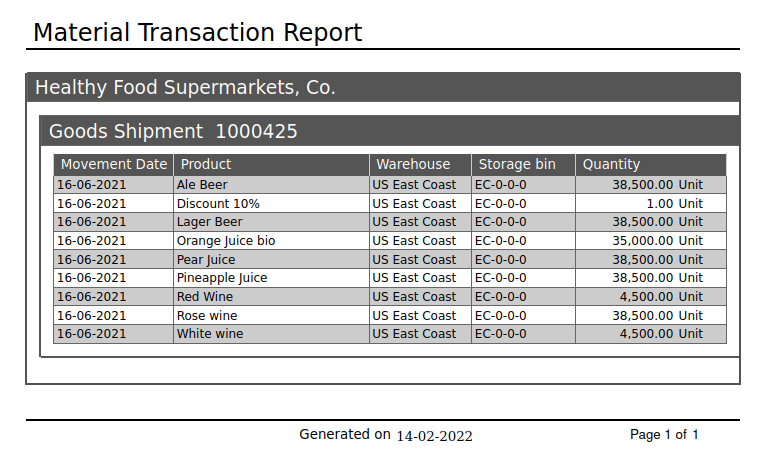
The report output is organized by Business Partner and, within each partner, by document number, which appears as a section header, for example Goods Shipment 1000425. For each transaction line, the following columns are displayed:
- Movement Date: The date the transaction was recorded.
- Product: The name of the product involved in the transaction.
- Warehouse: The warehouse where the transaction took place.
- Storage Bin: The specific location (shelf, rack, or section) within the warehouse where the product was stored or retrieved.
- Quantity: The quantity of the product moved in the transaction, along with its unit of measure.
This work is a derivative of Warehouse Management by Openbravo Wiki, used under CC BY-SA 2.5 ES. This work is licensed under CC BY-SA 2.5 by Etendo.