Stock Report
Application > Warehouse Management > Analysis Tools > Stock Report
Overview
The Stock Report shows current stock levels for all products with inventory different from zero (including negative on-hand quantities). Data is grouped by product category, with each row displaying the product, warehouse, and storage bin location. This report provides quick visibility into how inventory is distributed across warehouses and bins.
A storage bin is a specific physical spot within a warehouse (for example, a shelf or slot), identified by a row, stack, and level, similar to a coordinate on a map.
Regularly reviewing the Stock Report helps maintain inventory accuracy and supports better purchasing decisions. By identifying products that are running low or accumulating beyond expected levels, users can take timely action to avoid stockouts that delay operations or overstock situations that tie up capital and warehouse space. This makes the report a practical tool for keeping inventory aligned with actual business demand.
Primary Filters
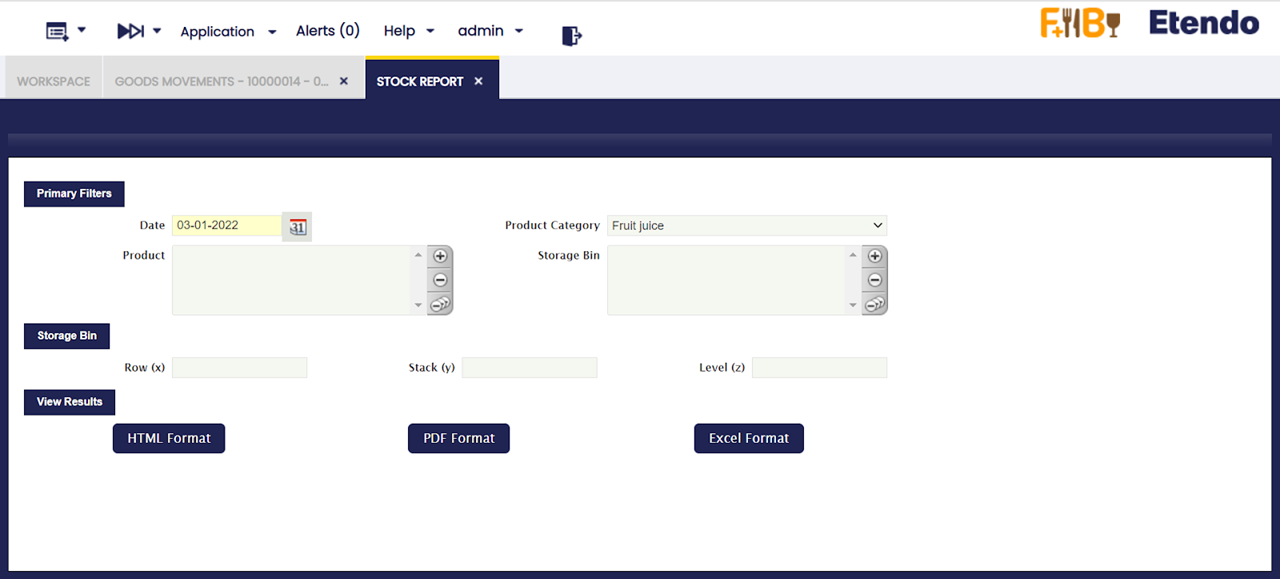
The outcome of this report can be filtered by using the following parameters:
- Date: Filters transactions up to the selected date.
- Product Category: Limits the report to a specific product category.
- Product: Filters the report to a specific product.
- Storage Bin: Filters the report to a specific storage bin selected from the list.
Storage Bin
Instead of picking a bin from the list, narrow the report to bins at a specific row, stack, and/or level position, the same coordinates shown on the storage bin label:
- Row (x): Horizontal position of the storage bin.
- Stack (y): Depth position of the storage bin.
- Level (z): Vertical position of the storage bin.
View Results
After setting the filters you need, the report appears in the View Results section. Export it using the HTML Format, PDF Format, or Excel Format buttons, if needed.
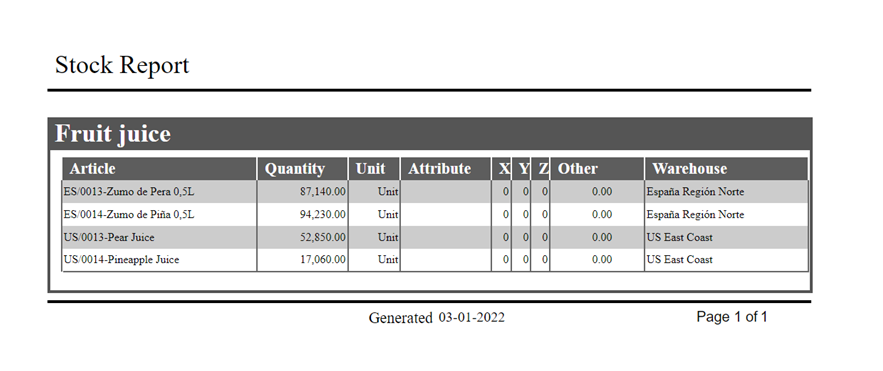
The report output includes the following columns:
- Article: Name or code of the product.
- Quantity: Current quantity on hand.
- Unit: Unit of measure for the product.
- Attribute: Product characteristics such as size, color, or lot number, if defined for the product.
- X: Row position within the storage bin (horizontal location).
- Y: Stack position within the storage bin (depth location).
- Z: Level position within the storage bin (vertical location).
- Warehouse: Warehouse where the stock is located.
Info
X, Y, Z columns in the report correspond to Row (x), Stack (y) and Level (z) of the storage bin.
This work is a derivative of Warehouse Management by Openbravo Wiki, used under CC BY-SA 2.5 ES. This work is licensed under CC BY-SA 2.5 by Etendo.