Assets
Application > Financial Management > Assets > Assets
Overview
The user can define company-owned assets and configure their amortization characteristics.
Assets window
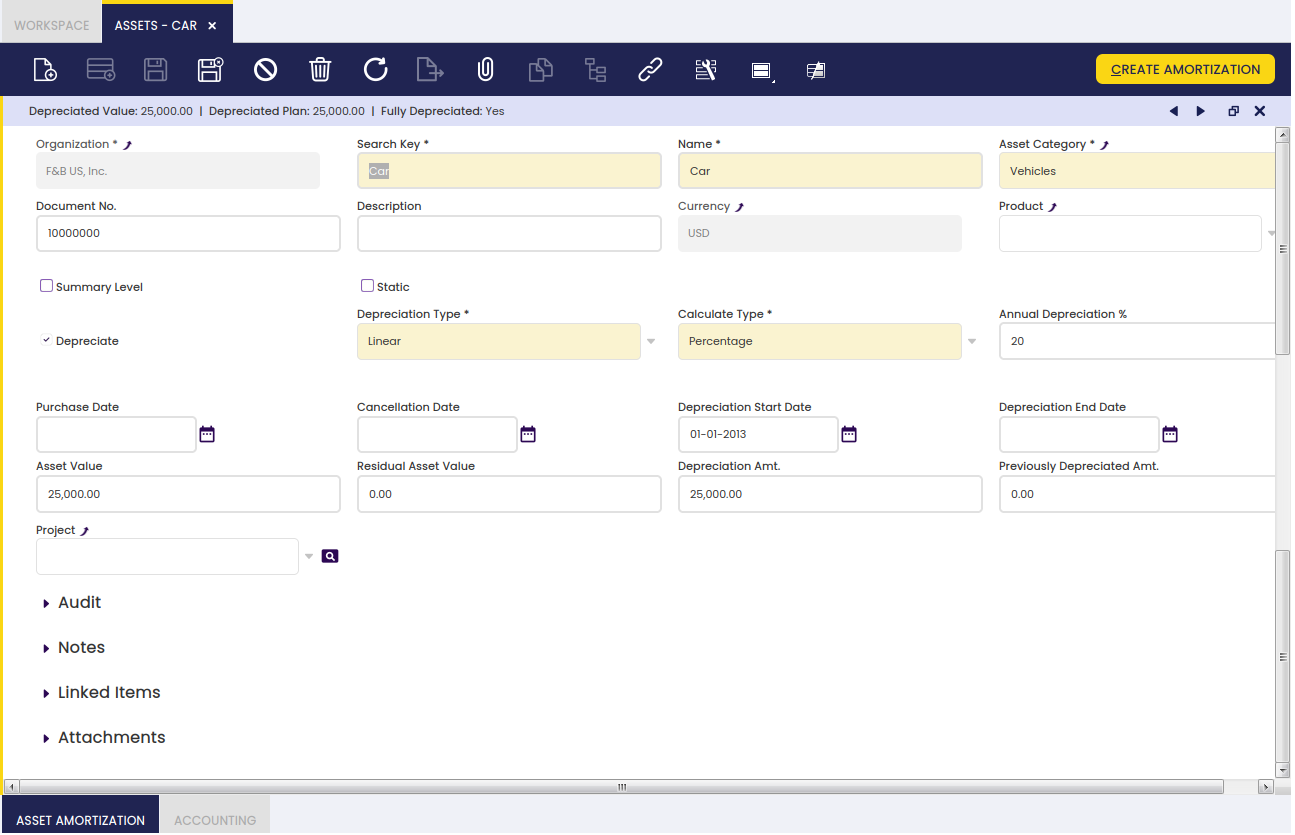
Fields to note:
- Organization : Organizational entity within client.
- Search Key : A fast method for finding a particular record.
- Name : A non-unique identifier for a record/document often used as a search tool.
- Asset Category : A classification of assets based on similar characteristics defined in the Asset Group window. Configuration fields will be completed automatically according to the characteristics defined in this window.
- Document No. : An automatically generated identifier for all documents.
- Description : A space to write additional related information.
- Currency : An accepted medium of monetary exchange that may vary across countries.
- Product : An item produced by a process.
- Summary Level : When checked, it groups other assets and displays them in tree view.
- Static : Prevents from moving the record into the tree view.
- Depreciate : The asset is used internally and will be depreciated.
- Depreciation Type : Linear. It indicates the method used to depreciate this asset.
- Calculate Type : It indicates how amortization will be calculated: Time (monthly or yearly) or Percentage (yearly).
- Annual Depreciation % : Depreciation annual %
- Amortize : Asset schedule.
- Usable Life - Years : Years of the usable life of the asset.
- Usable Life - Months : Months of the usable life of the asset.
- Every Month Is 30 Day : If checked, it calculates the amortization plan every month to be considered as a 30 day month and years of 365 days. If it is not checked, it considers real month days and leap-years.
- Purchase Date : Purchase date.
- Cancellation Date : life-utility date.
- Depreciation Start Date : Depreciation Start Date. The amortization plan will be calculated starting from this date.
- Depreciation End Date : Depreciation end date.
- Asset Value : Asset value.
- Residual Asset Value : Residual asset value amount.
- Depreciation Amt. : Depreciation Amount.
- Previously Depreciated Amt. : This amount is subtracted to the Depreciation amount when calculating the amortization plan. Total amount to be depreciated = Depreciation Amount - Previously Depreciated Amount
- Depreciated Value : Depreciated value.
- Project : Identifier of a project defined within the Project & Service Management module.
Buttons
-
Create Amortization: The Create Amortization button populates the Asset Amortization tab. It creates the amortization plan based on the asset definition.
-
Recalculate Amortization: The Recalculate Amortization button allows the user to update information when needed.
Asset Amortization tab
Asset amortizations for a selected asset are added to this tab.
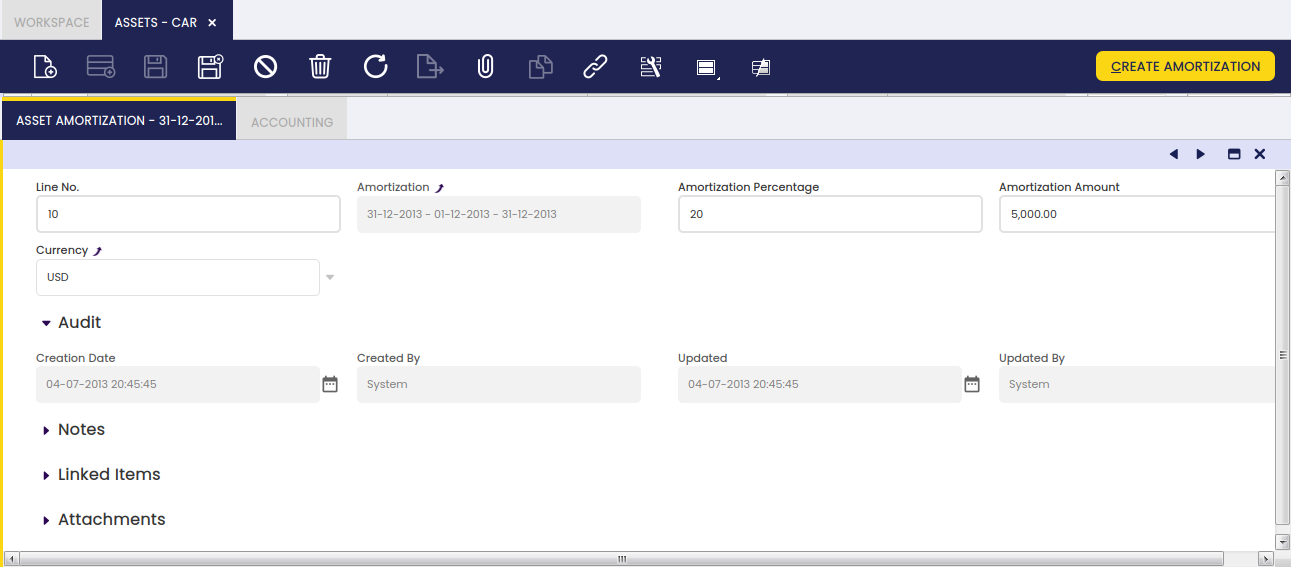
- Line No. : A line stating the position of this request in the document.
- Amortization : The depreciation or reduction of a product value over time.
- Amortization Percentage : Amortization Percentage
- Amortization Amount : Amortization Amount
- Currency : An accepted medium of monetary exchange that may vary across countries.
The Asset Amortization tab shows the depreciation plan of the asset based on its usable life-time and its value that is the amount to be depreciated. The asset value is split within its usable life (months or years), therefore each depreciation plan line represents a percentage of the total depreciation amount of the asset.
Note
It is important to remark that the proposed depreciation plan lines can be manually removed whenever they are not processed and posted. In that case, the create amortization process can be executed once again, therefore the depreciation plan is recalculated. This is very useful in those cases where the value of an asset changes or the usable life-time of an asset changes once its depreciation has started.
There is a restriction though, when removing lines, if the user plans to click the Recalculate Amortization button afterwards. The lines must be removed always starting from the latest one and without leaving undeleted lines in between. For example, having amortization lines such as:
- Line 10 - January depreciation plan line
- Line 20 - February depreciation plan line
- Line 30 - March depreciation plan line
The depreciation line of February cannot be removed until the depreciation line of March is removed.
The process assumes that if the March depreciation line exists, then the February depreciation line exists.
Accounting tab
The user can create and edit G/L accounts to be used in transactions which include a selected asset.
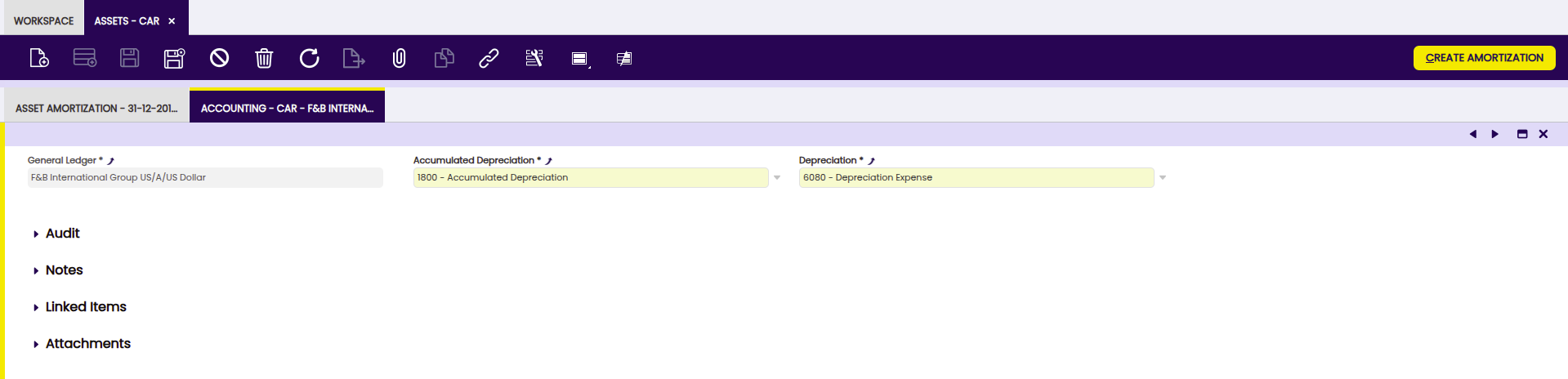
- General Ledger: The book containing all financial transactions recorded for the legal entity.
- Accumulated Depreciation: Accumulated Depreciation Account.
- Depreciation: Depreciation account.
The shown accounts are configured by default and can be changed.
Accounting Dimensions Assets
Info
To be able to include this functionality, the Financial Extensions Bundle must be installed. To do that, follow the instructions from the marketplace: Financial Extensions Bundle. For more information about the available versions, core compatibility and new features, visit Financial Extensions - Release notes.
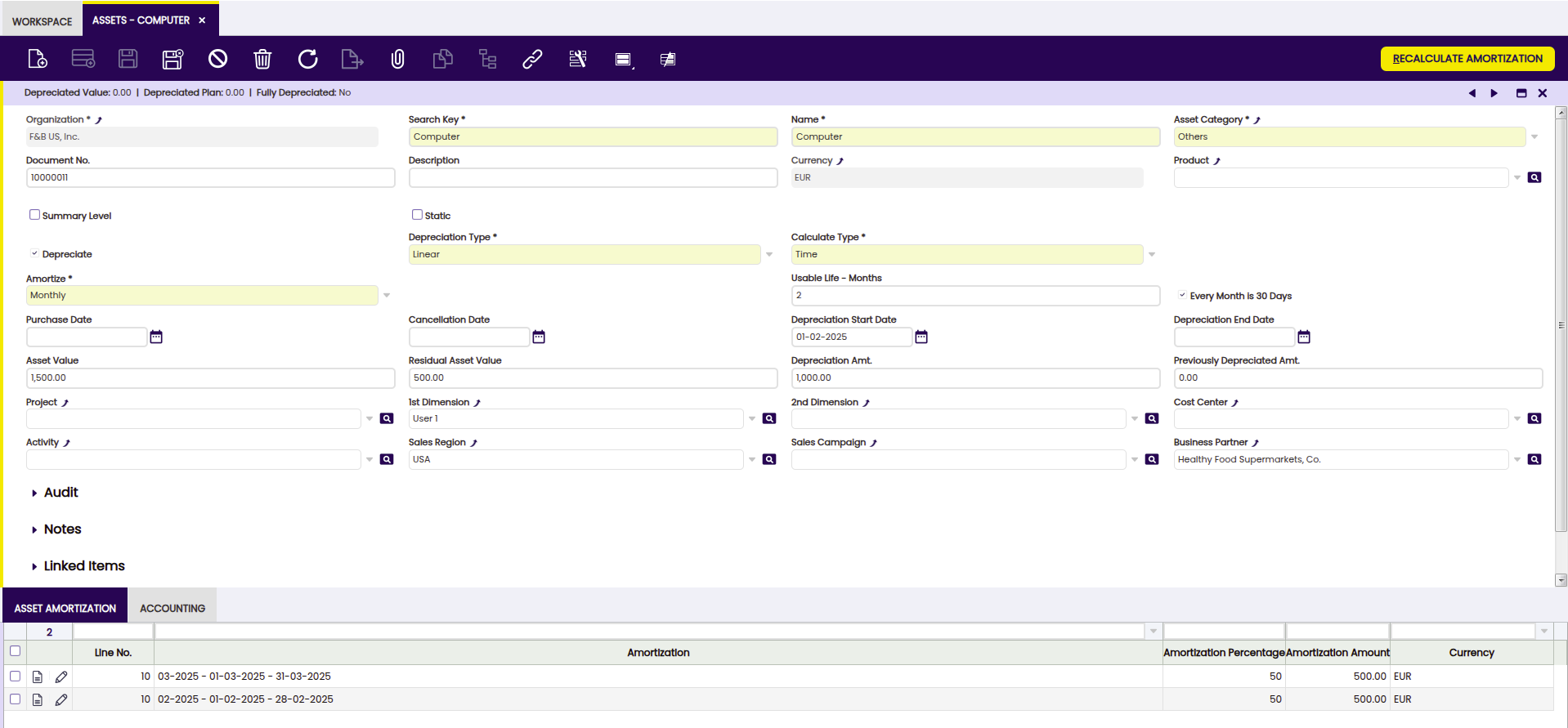
In addition to the existing Product dimensions for assets, this module allows users to select additional accounting dimensions which will be automatically transferred to the amortization lines, allowing better integration with accounting processes.
The dimensions the user can apply to the asset creation process are the following:
- Business Partner
- Activity
- 1st Dimension
- 2nd Dimension
- Sales Region
- Campaign
- Cost Center
Info
When creating or recalculating the amortization schedule for an asset, the specified accounting dimensions are transferred to the lines of the amortization schedule.
Info
For more information about Dimensions configuration visit Dimensions.
Buttons
- Create Amortization: The Create Amortization button generates the amortization lines in the Asset Amortization tab related to the selected asset. In addition, these same lines are added in the Amortization window, grouping them only according to the depreciation period, (monthly or yearly) in case of calculated type (time) and even yearly for calculated type (percentage).
This work is a derivative of Financial Management by Openbravo Wiki, used under CC BY-SA 2.5 ES. This work is licensed under CC BY-SA 2.5 by Etendo.