Receivables Aging Schedule
Application > Financial Management > Receivables and Payables > Analysis Tools > Receivables Aging Schedule
Overview
The report shows the past due receivables as of the date the user selects.
Source of Information
The source of the information for this report is invoices as the origin of the receivables and the payables.
- Invoices
- The due date of an invoice depends on the payment terms, and it is calculated based on the invoice date.
- If invoice has multiple payment plan lines, each line has its own due date.
- If there exists payments against the invoice, only those which are in a not confirmed status as of the date of the date filter are considered for this report.
Multi-currency
This report supports multi-currency.
- Invoices: If the exchange rate exists at document level, then the amount is calculated based on this value, if it does not exist, then the rate is taken at client level (Conversion Rates window).
Filters
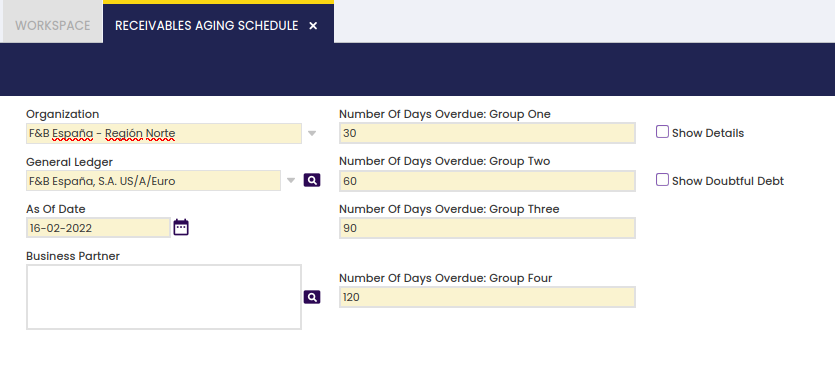
- Organization (Mandatory).
- General Ledger (Mandatory). The user can filter the results by organization's general ledger. All the amounts will be converted to the currency of the general ledger.
- As of Date (Mandatory). This is the date as of which the report will be processed. Past due dates and payment dates will be calculated based on this date.
- Business Partners (Optional). The user can select multiple Business Partners to filter the results.
- Number of Days Overdue: Group One/Two/Three/Four (Mandatory). The results shown are grouped according to the day ranges the user must enter. The user can enter the ending day for each range, and then, the application will automatically modify the beginning day for the next ranges. For example: in group One the user enters 30, so the range is now 0 - 30, in group Two the user enters 60 so the second range is 31 - 60, and so on and so forth.
- Show Details (Optional). This checkbox offers the user the option to either show the detailed version of the report or the summarized one. It is also used when printing and exporting to an xls file.
- Show Doubtful Debt (Optional). This checkbox offers the user the option to show information about Doubtful Debts in the report.
- Voided invoices need to be included (Only available if Preference "Enable void documents filter in Aging Reports" is set to Y). This checkbox offers the user the option to include/exclude voided documents from the report.
- Reversed payments need to be included (Only available if Preference "Enable reversed payment documents filter in Aging Reports" is set to Y). This checkbox offers the user the option to include/exclude reversed payment documents from the report.
HTML/PDF/Excel output
The report can be generated in HTML, PDF and Excel Spreadsheet format.
Receivables Aging Schedule
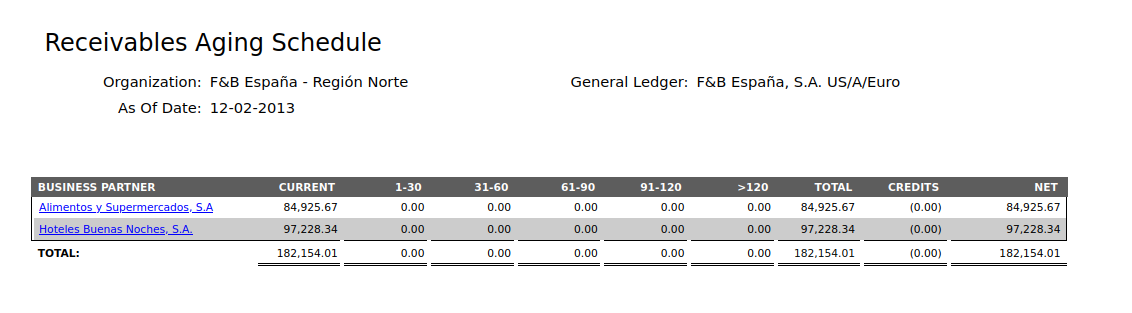
It should display a table showing the following data:
- Business partner. A business partner with pending receivables. This is also a link to the detailed version of the report for this Business Partner.
- Current. A sum of all the current debts the business partner has with the organization that are not due as of the date selected.
- First day range. The amount the business partner owes the organization that is due, and its due date is between the range.
- Second day range. Same as above.
- Third day range. Same as above.
- Fourth day range. Same as above.
- Fifth day range. Same as above.
- Total. Current + All the amounts of the day ranges
- Credits. Amount of money that the business partner has left as credit, to be used later. The amount is between brackets because it must be subtracted when calculating the totals.
- Net. Total - Credit of the Business Partner.
If the credits are posted in the same account as the Receivables, then the Net would match the balance of the Business Partner. If the credits are posted in a different account, such as prepayments, then the balance of the Business Partner would match with the Total.
If the Show Doubtful Debt check is selected, two more fields are shown.
- Doubtful Debt. The amount classified as Doubtful Debt for that particular Business Partner.
- Percentage. The percentage that represents the Doubtful Debt over the Net Debt of that particular Business Partner.
Also, when Show Doubtful Debt is selected, the Total amount is the sum of all the debts that are not doubtful. Therefore, the Net is Total + Doubtful - Credits
Receivables Aging Schedule Details
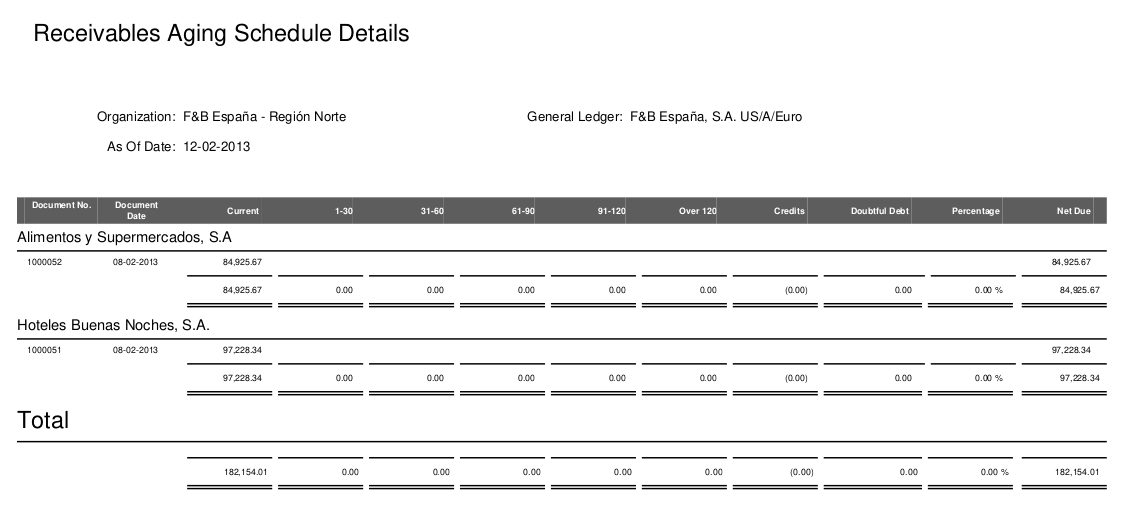
It should display a table showing the following data: By clicking on the PDF or the XLS link, either a PDF or a spreadsheet file are generated.
The information is grouped by Business Partner, in case the report is run for more than one. For each Business Partner, the information shown is:
- Document No.. The number of the document and also a link to it.
- Document Date. The accounting date of the document.
- Past due date buckets. The pending amount of the Invoice. It is shown in one column or another depending on the due date and the as of date filter.
- Net Due. The outstanding amount of the Invoice as of date. It is the sum of the amounts in the past due date buckets.
- Credits. Each line represents a Payment that has generated credit, and the amount is the credit left to be used as of date. The amount is between brackets because it must be subtracted when calculating the totals.
- A summary line for the Past due date buckets and Credits.
If the credits are posted in the same account as the Receivables, then the total Net Due would match the balance of the Business Partner. If the credits are posted in a different account, such as prepayments, then the balance of the Business Partner would match with the total Net Due plus the Credits (undoing the subtraction of the credits to the total).
Plus, there is a summary line for all the Business Partners.
If the Show Doubtful Debt check is selected, two more fields are shown.
- Doubtful Debt. The amount classified as Doubtful Debt for that particular Invoice.
- Percentage. The percentage that represents the Doubtful Debt over the Net Due of that particular Invoice.
Also, when Show Doubtful Debt is selected, the Total amount is the sum of all the debts that are not doubtful. Therefore, the Net Due is Total + Doubtful - Credits
This work is a derivative of Financial Management by Openbravo Wiki, used under CC BY-SA 2.5 ES. This work is licensed under CC BY-SA 2.5 by Etendo.