Product Movements Report
Application > Warehouse Management > Analysis Tools > Product Movements Report
Overview
The Product Movements Report provides a consolidated view of all product movements that have taken place across your warehouses. It covers goods receipts, goods shipments, inventory movements, physical inventory adjustments, production transactions, internal consumptions, and returns, all grouped by transaction type and business partner.
This report helps warehouse managers and logistics coordinators answer key business questions such as:
- What products moved in or out during a specific period?: Track inbound and outbound flow to understand demand patterns.
- Which business partners are associated with each movement?: Identify goods receipts and goods shipments at a glance.
- Where did products move from and to?: See the starting and final warehouse and storage bin locations for every transaction.
- Are there inventory discrepancies?: Compare physical inventory adjustments against expected stock levels to investigate variances.
- What is the complete movement history of a product?: Audit the full trail of a specific product across all transaction types.
For a broader understanding of warehouse operations, see Warehouse Management Getting Started and Warehouse Transactions.
Parameters Window
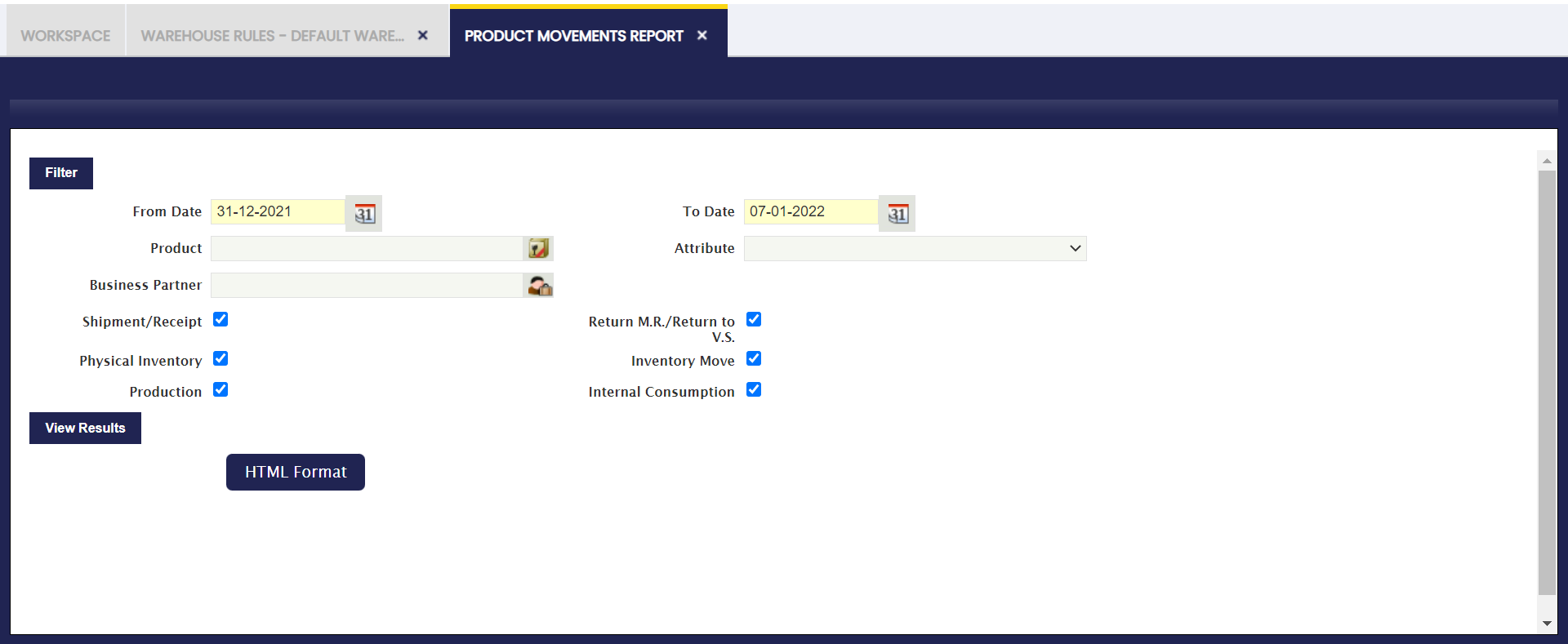
Use the parameters window to filter the report before generating it. The available filters are:
- From Date / To Date: Define the date range for the movements to include. Only transactions within this period appear in the report.
- Product: Filter by a specific product. Leave blank to include all products.
- Attribute: Filter by a product attribute (such as size, color, or lot). Leave blank to include all attributes.
- Business Partner: Filter by a specific business partner (customer or supplier). Leave blank to include all partners.
Additionally, use the checkboxes to include or exclude specific transaction types:
- Shipment/Receipt: Includes outgoing shipments to customers and incoming receipts from suppliers.
- Return M.R./Return to V.S.: Includes material returns (Return M.R.) and returns to vendors (Return to V.S.).
- Physical Inventory: Includes adjustments made during physical inventory counts.
- Inventory Move: Includes movements of products between warehouses or storage bins.
- Production: Includes transactions generated by production or manufacturing processes.
- Internal Consumption: Includes products consumed internally (not shipped to an external partner).
All checkboxes are enabled by default. Uncheck any type to exclude it from the results.
After setting the desired filters, click View Results to generate the report. The report can also be exported using the HTML Format button.
Report Output
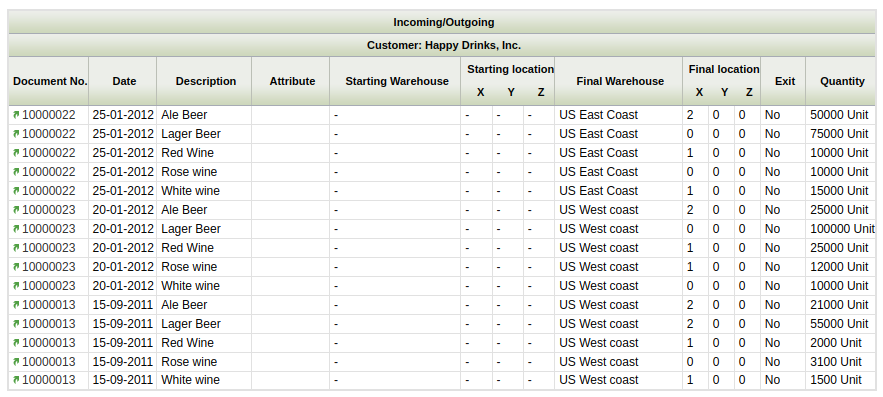
The report output displays movements grouped first by transaction type (for example, Incoming/Outgoing) and then by business partner. Each row represents a single product movement with the following columns:
- Document No.: The unique identifier of the source document (receipt, shipment, inventory count, etc.).
- Date: The date the movement was recorded.
- Description: The name or description of the product involved in the movement.
- Attribute: The product attribute value, if applicable (for example, lot number or variant).
- Starting Warehouse: The warehouse where the product originated before the movement.
- Starting Location (X, Y, Z): The storage bin coordinates (Row, Stack, Level) in the starting warehouse.
- Final Warehouse: The warehouse where the product was received or moved to.
- Final Location (X, Y, Z): The storage bin coordinates (Row, Stack, Level) in the final warehouse.
- Exit: Indicates whether the product left the organization (Yes/No).
- Quantity: The number of units moved, along with the unit of measure.
This work is a derivative of Warehouse Management by Openbravo Wiki, used under CC BY-SA 2.5 ES. This work is licensed under CC BY-SA 2.5 by Etendo.