Document Sequence
Application > Financial Management > Accounting > Setup > Document Sequence
Overview
Every document in Etendo can be numbered and therefore linked to a document sequence.
Etendo "reference data" including the standard list of document types also includes a standard list of document sequence linked to those documents which make sense to number.
"Standard" document sequences are listed in the document sequence window.
It is important to remark that:
- it is possible to change "standard" document sequences, for instance:
- the "AP Invoice" document type is created by default linked to a document sequence which is setup as Auto Numbering
- that sequence can be changed by removing the Auto Numbering checkbox, which would imply that "AP Invoice" numbers will have to be manually entered according to the supplier's invoice number.
- The most common scenario is that different document types have different document sequences, however it is also possible that a set of different document types share the same document sequence in order to get the same consecutive numbering.
Sequences
Document sequence window allows the user to define how document sequences are going to behave.
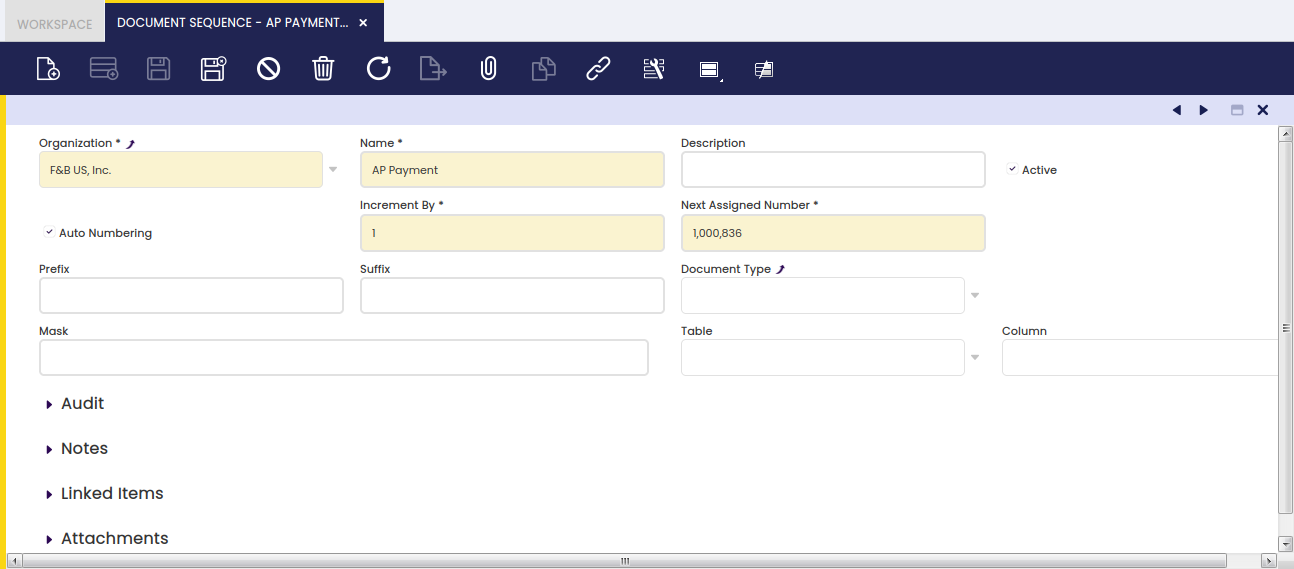
As shown in the image above, a document number sequence can be set as "Auto Numbering" which means that the document linked to that sequence will get a document number automatically generated by the sequence.
It is also possible to define how the "Auto Numbering" type document sequence are going to behave in terms of:
- how numbering is going to be incremented by
- what is going to be the next number assigned
- if it requires a given prefix or suffix
Info
The number logic is applied when saving the document.
Masked Sequences
Transactional and Non-transactional Sequences can be used in any document and any field. In this new sequences, the masks can be added with dynamic dates or strings.
The user can filter the new sequence according to the organization, document type and mask, the mask is ####### by default. This sequences could be created with the Create sequences process in General Setup > Aplication > Create Sequences window.
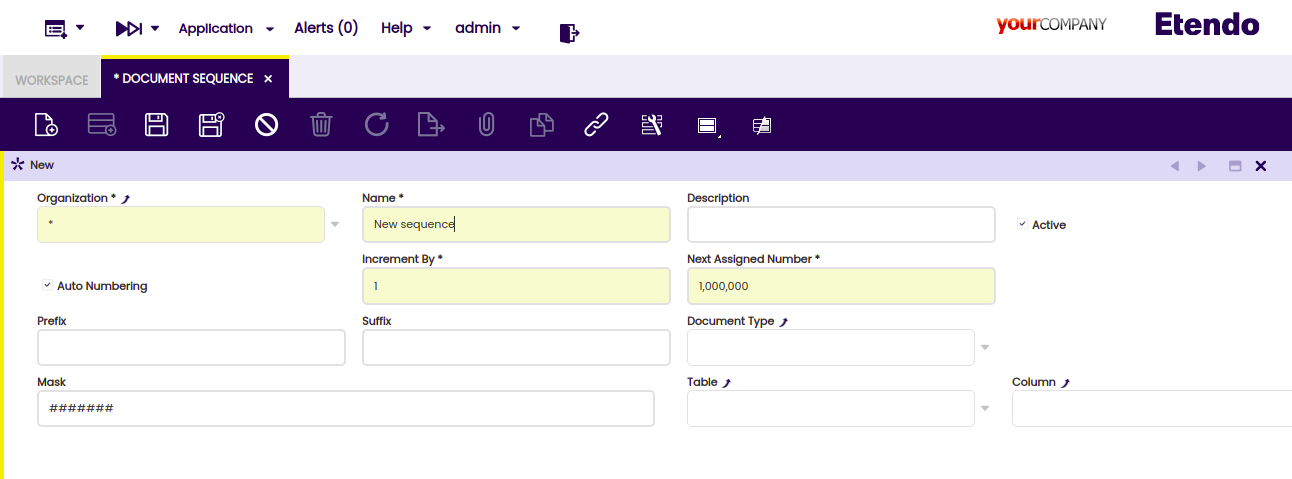
- Mask: It is a string to define a parse format, with the possibility of creating a dynamic date or literal substring in addition to the formatted incremental number.
Sequence Masking
Sequence masking always uses numeric key to parse the input. Therefore, the mask must have at least the same number of '#' or '*' chars as the length of the Next Assigned Number field. (Seven is the length of this field by default)
Data Time Formatting
| Letter | Type | Presentation | Examples |
|---|---|---|---|
| G | Era designator | Text | AD |
| y | Year | Year | 1996; 96 |
| Y | Week year | Year | 2009; 09 |
| M | Month in year | Month | July; Jul; 07 |
| w | Week in year | Number | 27 |
| W | Week in month | Number | 2 |
| D | Day in year | Number | 189 |
| d | Day in month | Number | 10 |
| F | Day of week in month | Number | 2 |
| E | Day name in week | Tuesday; Tue | |
| u | Day number of week (1 = Monday) | Number | 1 |
| a | Am/pm marker | Text | PM |
| H | Hour in day (0-23) | Number | 0 |
| k | Hour in day (1-24) | Number | 24 |
| K | Hour in am/pm (0-11) | Number | 0 |
| h | Hour in am/pm (1-12) | Number | 12 |
| m | Minute in hour | Number | 30 |
| s | Second in minute | Number | 55 |
| S | Millisecond | Number | 978 |
| z | Time zone | General time zone | Pacific Standard Time; PST; GMT-08:00 |
| Z | Time zone | RFC 822 time zone | -0800 |
| X | Time zone | ISO 8601 time zone | -08; -0800; -08:00 |
| ‘ ’ | Literal | Text |
Parse Formatting
| Letter | Type | Presentation | Examples |
|---|---|---|---|
| ## | Digit Key | Digit | 9 |
| ! | Literal Key | Literal | |
| l | Lower Case | Char | a |
| x | Hexadecimal | Number | 10F |
| U | Upper Case | char | A |
| A | Alpha Numeric | Number | h0l4 |
| ? | Character | Char | h |
| * | Anything | * | * |
Info
The parse is resolved in two steps, first dates and then types. For this reason if the parse formatting characters like ‘l’, ‘x’ ‘U’ or ‘A’ are used, the character ‘!’ should be used to escape each character.
Examples
| Mask | Input | Result |
|---|---|---|
| ##-### | 1 | 00-01 |
| #!### | 12 | 1#2 |
| ##-'YE!AR'-### | 21 | 00-YEAR-21 |
| yy-MM-dd/### | 1 | 21-08-31/01 |
| y-#### | 25 | 2021-025 |
This work is a derivative of Document Sequence by Openbravo Wiki, used under CC BY-SA 2.5 ES. This work is licensed under CC BY-SA 2.5 by Etendo.