How to Use Secure Web Services
Overview
This module allows calling any standard Etendo web service in the same way as calling the /ws endpoint, but using token authentication.
This authentication method also allows defining the context for the calls by choosing the role and or organization when requesting a token. It is also possible to renew a token to refresh the expiration date or change the role/organization.
Besides the authentication implementation, the module includes utilities for developers and useful web services, such as jsonDal (to access the OB Data Access Layer with json).
Setup
Warning
A valid domain name and SSL/TLS certificate are required to use Secure Web Services. Please install a certificate or contact your administrator to avoid runtime errors when generating tokens in server instances.
Info
By default, the ES256 encryption algorithm is used. To switch to a legacy algorithm, create a preference with the property Encryption Algorithm and set its value to HS256.
Token Configuration
Application > General Setup > Client > Client
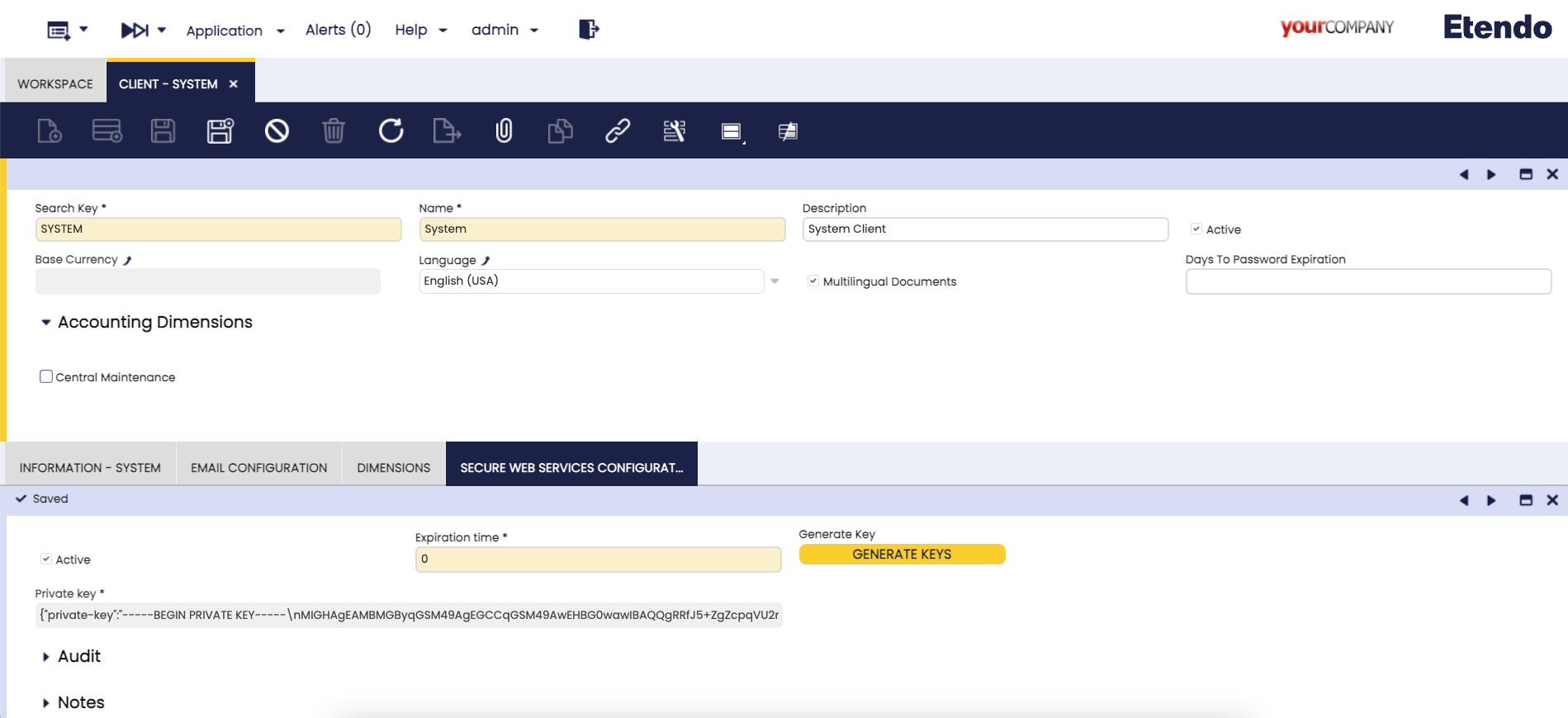
In the Secure Web Service Configuration tab, the System Administrator can manage the SWS key and configure token expiration.
Starting from Etendo 26.1, the key is automatically generated during ./gradlew install — no manual action is required for new installations. For earlier versions or to rotate the key, use one of the following methods:
-
From the command line:
-
From the UI: Open the Secure Web Service Configuration tab and click Generate Key.
Warning
Both methods overwrite the existing SWS key. All tokens signed with the previous key are immediately invalidated.
The Token expiration field controls how long tokens remain valid, expressed in minutes (0 = no expiration).
Security recommendation
Non-expiring tokens pose a risk in production — a compromised token remains valid indefinitely. Set a reasonable expiration time and rotate tokens periodically.
Secure Web Services Swagger
Info
For more information, visit Secure Web Services Swagger.
This work is licensed under CC BY-SA 2.5 ES by Futit Services S.L.