How to Configure Etendo Main UI
Overview
Etendo Main UI is a modern React/TypeScript-based user interface included in the base Etendo installation. It runs as a containerized Docker service alongside the Etendo instance and is started automatically with ./gradlew resources.up.
This guide covers manual configuration of the Main UI variables and the advanced development setup for contributors.
Requirements
- Etendo project properly set up. See the Local Development or Server Installation guides.
- Docker version
26.0.0or higher - Docker Compose version
2.26.0or higher
Warning
Avoid installing Docker via Snap — its sandbox restrictions may prevent Etendo Docker containers from accessing host directories correctly. Install Docker following the official guide for your distribution.
Info
The Docker Management module, included as a dependency, manages the distribution of infrastructure within Etendo modules via Docker containers.
Client Access Token
Application > General Setup > Client > Client
A one-time encryption token must be configured for authentication. This token is required for the Main UI to start a session.
- Access Etendo Classic as a
System Administrator. - Navigate to
Client>Secure Web Service Configurationtab. - Click Generate Key to create a token. The expiration time is in minutes; set to
0for no expiration.
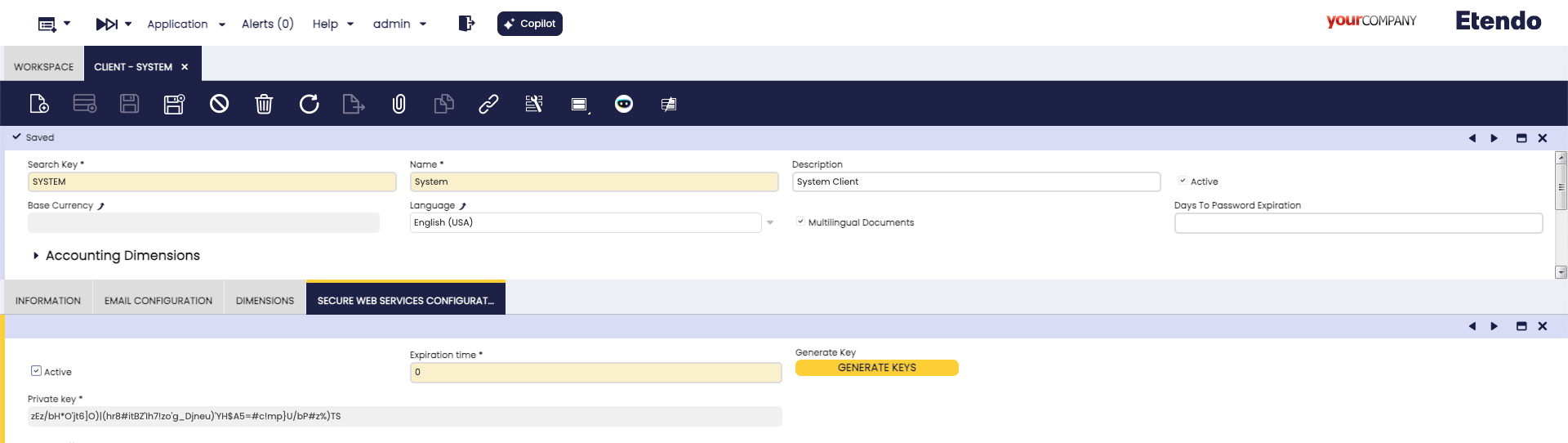
Info
This token does not require any further action — it just needs to be generated for the authentication process to work correctly.
Configuration
Using the Interactive Setup
Run the interactive configuration assistant to set all required variables:
For a full walkthrough, see the How to Use the Interactive Setup guide.
Then start the Docker services:
Manual Configuration
Add the following variables to gradle.properties:
docker_com.etendoerp.mainui=true
etendo.classic.url=http://host.docker.internal:8080/etendo
etendo.classic.host=http://localhost:8080/etendo
authentication.class=com.etendoerp.etendorx.auth.SWSAuthenticationManager
ws.maxInactiveInterval=3600
next.public.app.url=http://localhost:3000
| Variable | Description | Local | Production |
|---|---|---|---|
docker_com.etendoerp.mainui |
Enables the Main UI Docker service. | true |
true |
etendo.classic.url |
Backend URL used by the Main UI server to connect to Etendo Classic. Use host.docker.internal when Main UI runs in Docker and Tomcat runs locally. |
http://host.docker.internal:8080/etendo |
https://your.backend.etendo.cloud/etendo |
etendo.classic.host |
Client-side URL the browser uses to make direct requests to Etendo Classic. | http://localhost:8080/etendo |
https://your-domain.com/etendo |
authentication.class |
Java class that manages authentication between Main UI and Etendo Classic. | com.etendoerp.etendorx.auth.SWSAuthenticationManager |
com.etendoerp.etendorx.auth.SWSAuthenticationManager |
ws.maxInactiveInterval |
Session duration in seconds for the Main UI WebSocket connection. Does not affect Etendo Classic session timeout. | 3600 |
3600 |
next.public.app.url |
Public URL where users access the Main UI. | http://localhost:3000 |
https://your.frontend.etendo.cloud |
Apply the configuration and start services:
Access the Main UI
Once all services are running, the Main UI is available at:
| Environment | URL |
|---|---|
| Local | http://localhost:3000 |
| Production | https://<server-address>/ |
Advanced Configuration
This section is for developers who want to contribute to or customize the Main UI codebase directly.
Additional Requirements
- Node.js version
^18.0.0or higher - pnpm version
^9.15.2
Required Modules
Install the following modules in the modules/ directory:
cd modules
git clone git@github.com:etendosoftware/com.etendoerp.etendorx.git
git clone git@github.com:etendosoftware/com.etendoerp.openapi.git
git clone git@github.com:etendosoftware/com.etendoerp.metadata.git
git clone git@github.com:etendosoftware/com.etendoerp.metadata.template.git
Project Structure
com.etendorx.workspace-ui/
├── packages/
│   ├── api-client/          # API client for backend communication
│   ├── ComponentLibrary/    # Reusable UI components
│   └── MainUI/              # Main application
├── package.json
├── pnpm-workspace.yaml
└── README.md
Development Setup
-
Clone the Main UI development repository:
-
Install dependencies:
-
Create
packages/MainUI/.env.localand add the backend URL: -
Build required packages in order:
-
Start the development server:
The application is available at http://localhost:3000.
Development Commands
Root-level commands:
pnpm dev # Start Main UI development server
pnpm build # Build all packages
pnpm test # Run tests across all packages
pnpm lint # Lint all packages
pnpm lint:fix # Fix lint issues automatically
pnpm format # Format code across all packages
pnpm format:fix # Auto-fix formatting issues
pnpm clean # Clean all build artifacts
Per-package commands:
pnpm --filter @workspaceui/mainui dev
pnpm --filter @workspaceui/api-client build
pnpm --filter @workspaceui/componentlibrary build
pnpm --filter @workspaceui/api-client test
pnpm --filter @workspaceui/mainui lint
This work is licensed under CC BY-SA 2.5 ES by Futit Services S.L.